 PS Evolution
Send resources automatically to other villages in Tribal Wars
Resource Sending ships wood, clay and iron from a group of your villages to a list of destinations. Use it to supply your minting group, other villages of yours, and allies.
It lives inside the Minting Hub, on the "Resource Sending" tab. The account session must be connected.
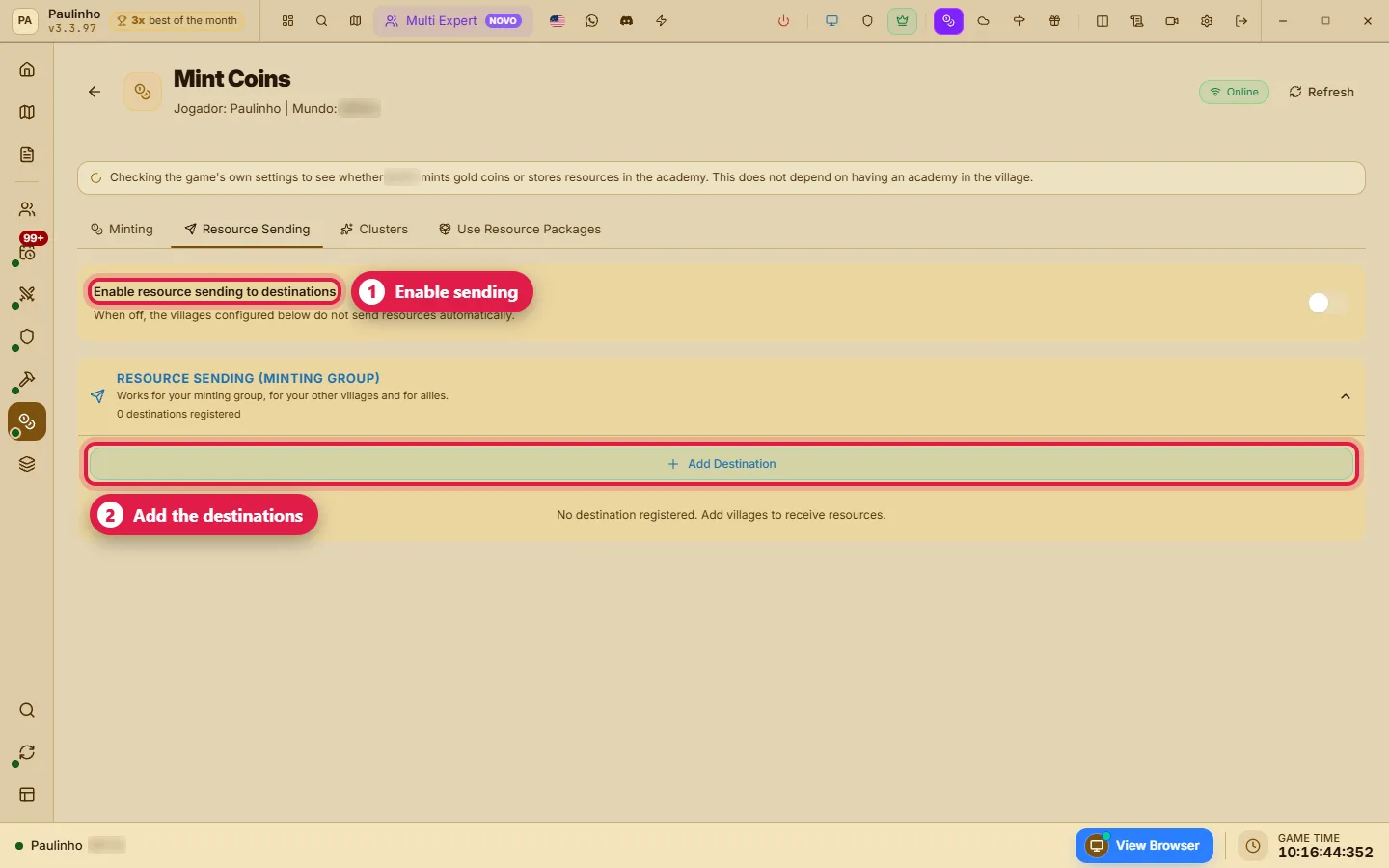
Step by step
-
Enable sending
At the top of the tab, turn on "Enable resource sending to destinations". When it is off, no destination sends on its own.
-
Add the destinations
Click "Add Destination" and paste the coordinates in the
500|500format, a whole list if you want: the app takes the last coordinate on each line and validates them one by one. You can also pick from "Your villages:". -
Set where it comes from and how much
Pick the "Source Group", the "Send Mode" ("Coin Cost" or "Proportional"), the "Reserve (%)" that stays in the source villages, the "Max Dist" (default 100 fields), the "Interval (min)" and the "Resource Limits" (0 = unlimited). Under "Sort villages by distance", choose closest or farthest first.
-
Turn on auto mode
Click "Auto: OFF" so it becomes "Auto: ON". To send right away, use "Send" on the destination or "Send" for all active destinations.
-
Track progress
The "Pending" and "Completed" filters show who has already received. "Export" builds a sending report with the total of each resource and the progress of each destination.
What each option does
| Option | What it is for |
|---|---|
| Enable on add | New destinations come in already enabled. |
| Reset stats | Resets what has already been sent to a destination. |
| Cluster Generator (Clusters tab) | In "Open Map and Configure", say how many clusters you want. Each cluster has a "Central" village (mints and requests resources) and "Satellites" (send resources). "Apply" sets up minting and sending in one go. |
Tips
- To feed your minting, the Cluster Generator sets everything up at once and saves you from configuring village by village.
- Keep a reserve in the source villages so they are not left without resources to build and recruit.
Common problems
The destination doesn't send on its own.
Check that "Enable resource sending to destinations" is on and that the top shows "Auto: ON". With auto mode off, each destination only sends through the manual button.
A coordinate shows as invalid.
The app validates each coordinate in the game. Make sure the village exists and the coordinate is in the xxx|yyy format.
Sending says "No resources".
The villages in the source group have no resources above the reserve, or are beyond the max distance.
See also
Do not have PS Evolution yet?
The download is free: download it, create your account inside the app and try everything for 24 hours, no card.