 PS Evolution
Tribal Wars churches and watchtowers: where to build them
Churches and Watchtowers is a planner with a map. On the Watchtowers tab, you say where the attacks come from and the app works out which of your villages would let a tower see the commands earliest. On the Churches tab, it builds the layout that covers your villages with faith (a village outside every radius fights at 50% strength) while spending as little as possible.
It only suggests: you do the building in the game. The screen reads current levels from the buildings overview, which requires a Premium Account. A world without churches or watchtowers shows the tab locked, but you can still simulate.
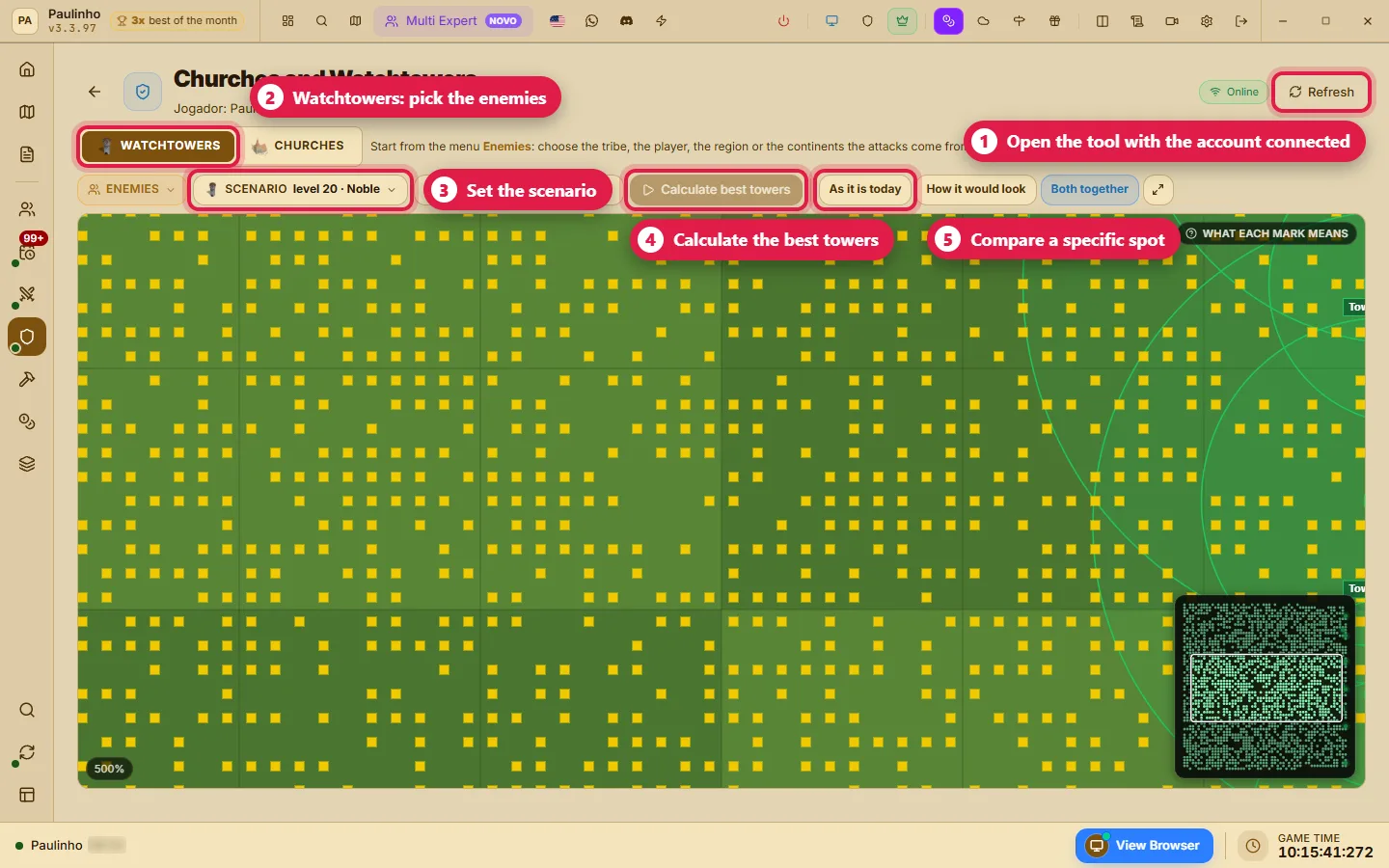
Step by step
-
Open the tool with the account connected
Go to Churches & Watchtowers. The app reads the buildings overview and downloads the world data. "Refresh" reads it again.
-
Watchtowers: pick the enemies
On the Watchtowers tab, open the "Enemies" menu and pick the tribe, player, region or continents the attacks come from.
-
Set the scenario
Under "Scenario", pick the level of the suggested towers and the pace of the enemy command (from nobleman, the slowest, to scout, the fastest). Under "How many towers to suggest", leave "Automatic": the analysis stops when the next tower no longer adds meaningful coverage.
-
Calculate the best towers
Click "Calculate best towers". The result lists the towers in order of gain, with "Catches at" (how much of the route was still left when the tower labeled it), new attacks seen, average and worst case, and the "Villages that would stay blind".
-
Compare a specific spot
Click one of your villages on the map to see what a tower there would cut, level by level, and the answer to "Is it worth leveling up?". Use "As it is today", "How it would look" and "Both together" to compare on the map.
-
Churches: build the plan
On the Churches tab, open "How to calculate": pick the starting point ("Keep the churches I already have" or "Show the ideal layout from scratch"), the max level (1, radius 4; 2, radius 6; 3, radius 8) and what to save on (population, number of churches or resources). The plan shows "Churches to build", "Churches you don't need" and "Still without faith".
What each option does
| Option | What it is for |
|---|---|
| Levels per village | Levels come from the game, but you can change them to simulate. For churches, you can lock a village with "Never suggest a church here". |
| Prioritize coverage over lead time | By default the analysis tries to see the attack as early as possible. When on, it tries to cover the largest number of attacks. |
| Cover the four directions | Spreads the towers across Northwest, Northeast, Southwest and Southeast instead of stacking them on the side most attacks come from. |
| First Church | It has radius 6, can't be leveled up and is unique. You choose whether it stays where it is or can move to another village. |
Tips
- For early detection, the highest tower level is always better; what changes is the population cost. The level table shows warning time gained per population spent.
- "Ideal from scratch" mode ignores the churches you already have: compare before demolishing anything.
- "Churches you don't need" are churches whose area is already covered by another one. Demolishing them gives the population back.
Common problems
I see "Could not read the buildings overview".
That game screen requires a Premium Account. Without it, the app has neither the village list nor the current levels.
The "Calculate best towers" button is grayed out.
Pick at least one tribe, player, region or continent in the "Enemies" menu. If there are still no routes, check that the selection has villages that are not yours.
No tower added coverage.
Your current towers already see those attacks, or the simulated radius does not reach the route. Raise the simulated level or pick enemies from another direction.
See also
Do not have PS Evolution yet?
The download is free: download it, create your account inside the app and try everything for 24 hours, no card.