 PS Evolution
Tribal Wars premium exchange bot: how to set it up in PS Evolution
Premium Exchange buys and sells resources on the game's premium exchange, following the rates you accept. Buying spends premium points to bring in resources; selling turns village resources into premium points.
It works with or without a Premium Account. Only villages with a level 1 or higher market can join. When you enable it, the app opens a Premium Exchange tab in the account session and works on one village at a time, in rotation.
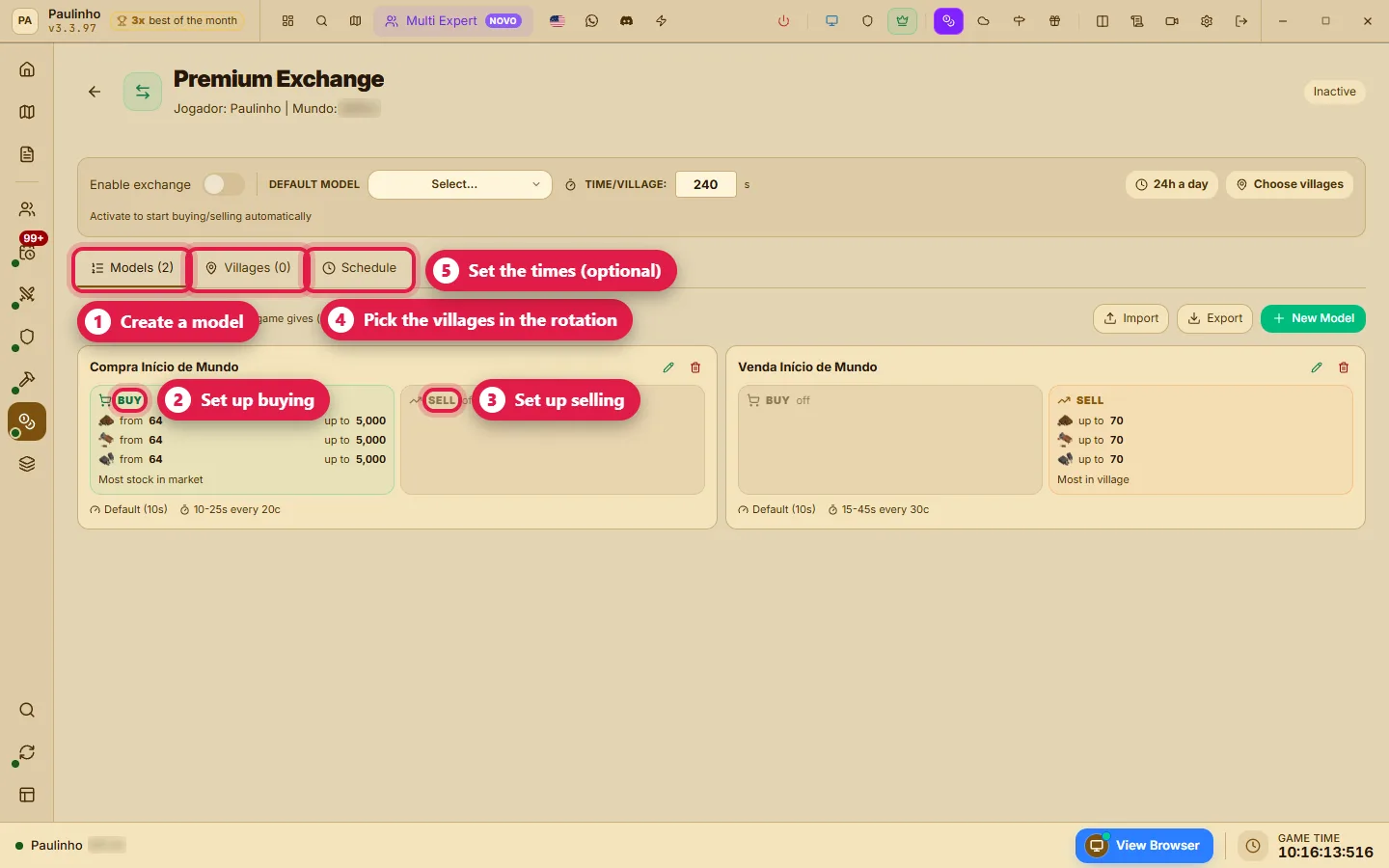
Step by step
-
Create a model
On the "Models" tab, click "New Model". It comes with default values and saves itself with every change on the card. The rate is how many resources the game gives (or asks) per 1 premium point.
-
Set up buying
Under "Buy", turn on the resources and set the "Minimum rate" (default 64), "Fill up to" as an amount or as "% of warehouse", "Buy at a time" (default 1,000) and "Min. market stock". Under "Who goes first", pick "Manual order", "Most stock in market" or "Least in village".
-
Set up selling
Under "Sell" (off by default), set the "Maximum rate" (default 800), "Keep in village", "Sell at a time" and, if you want, "Progressive", which sells more when the rate is better than the one you set.
-
Pick the villages in the rotation
On the "Villages" tab, check the villages. The script stays on one at a time for the "Default time" and moves to the next. Each village can use a different model and time. A village with "No market" cannot be picked.
-
Set the times (optional)
On the "Schedule" tab, turn on the time window and add "Trade" and "Pause" ranges, in game time or PC time. Outside the ranges the market tab is closed.
-
Enable it
Click "Enable exchange". You need a model and at least one selected village. "History" shows each purchase and sale, or the reason it did not trade.
What each option does
| Option | What it is for |
|---|---|
| Only watch with | When selling, with buying off: how much must be left above the reserve for the market to be watched. 0 always watches. |
| With incoming attack | "Keep reserve" respects "Keep in village". "Sell everything" sells with no reserve in the attacked village, so the resources don't become loot. |
| Rates | How fast rates refresh. "Default (10s)" forces nothing and relies on the game's own refresh; the faster options make more calls to the server. |
| Trading rhythm | Minimum and maximum wait between one trade and the next (default 8 to 16 seconds). The game rejects trades less than 8 seconds apart. |
| Default model | Model used by villages that did not pick a specific one. |
| Import and Export | Moves the models to another account or another PC in a file. |
Tips
- Start with buying only, with "Fill up to" as a % of warehouse (for example 80%), so you don't overflow the villages' warehouses.
- The "Least in village" priority counts what is already arriving from the market, so it doesn't buy again a resource that is still on its way.
Common problems
I see "Create a model before activating" or "Select at least one village before activating".
Premium Exchange needs a model and at least one village checked on the "Villages" tab.
History says "Current rate below minimum" or "above maximum".
The game is not offering your model's rate. Wait, or adjust the minimum buy rate or the maximum sell rate.
History says "No Premium Points".
Buying spends premium points. With no balance, it stops until you have PP again.
The market tab closes on its own.
The time window is on and the current time is outside the trading ranges. Check the "Schedule" tab.
See also
Do not have PS Evolution yet?
The download is free: download it, create your account inside the app and try everything for 24 hours, no card.