 PS Evolution
Tribal Wars captcha with PS Evolution: alerts, Auto Captcha and history
When the game asks for the anti-bot check (captcha), the account stops right away: farming, scavenging, building, recruiting, the scheduler, the noble tool and snipes all stay paused until the check is solved. After that everything resumes on its own.
The app alerts you through your notification channels and can try to solve it on its own with Auto Captcha, which you turn on account by account. Every plan includes Auto Captcha on up to 5 active accounts at the same time.
Step by step
-
Solve it when it shows up
With a captcha open, the account shows the "CAPTCHA" badge and a warning at the top of the app. Click Solve now (or "Open the browser and solve it"), solve the check in the account's browser and click "I solved it". The app checks and unlocks the account.
-
Or solve it from anywhere
Every captcha alert on WhatsApp, Telegram or Discord carries the link to solve it on your phone: open it, sign in to your PS Evolution account and solve the challenge there. You can also log in to the game from any browser and then tap "I solved it". The official game app does not show the check: it has to be done in a browser.
-
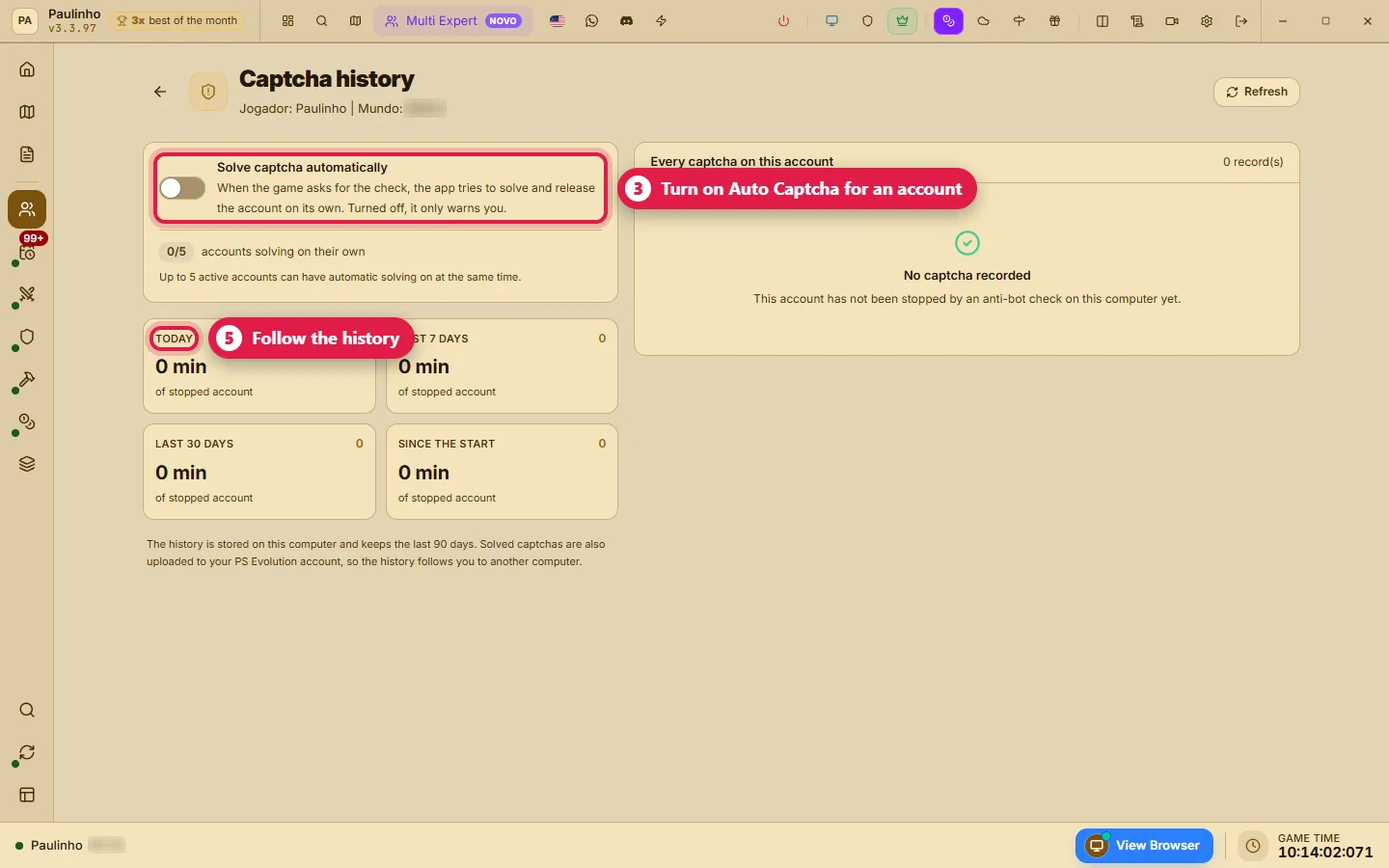
Turn on Auto Captcha for an account
In the account sidebar, click Auto Captcha. Turn on "Solve captcha automatically". Read the risk warning and, if you want to go ahead, click "Turn on anyway". The counter shows how many active accounts are solving on their own.
-
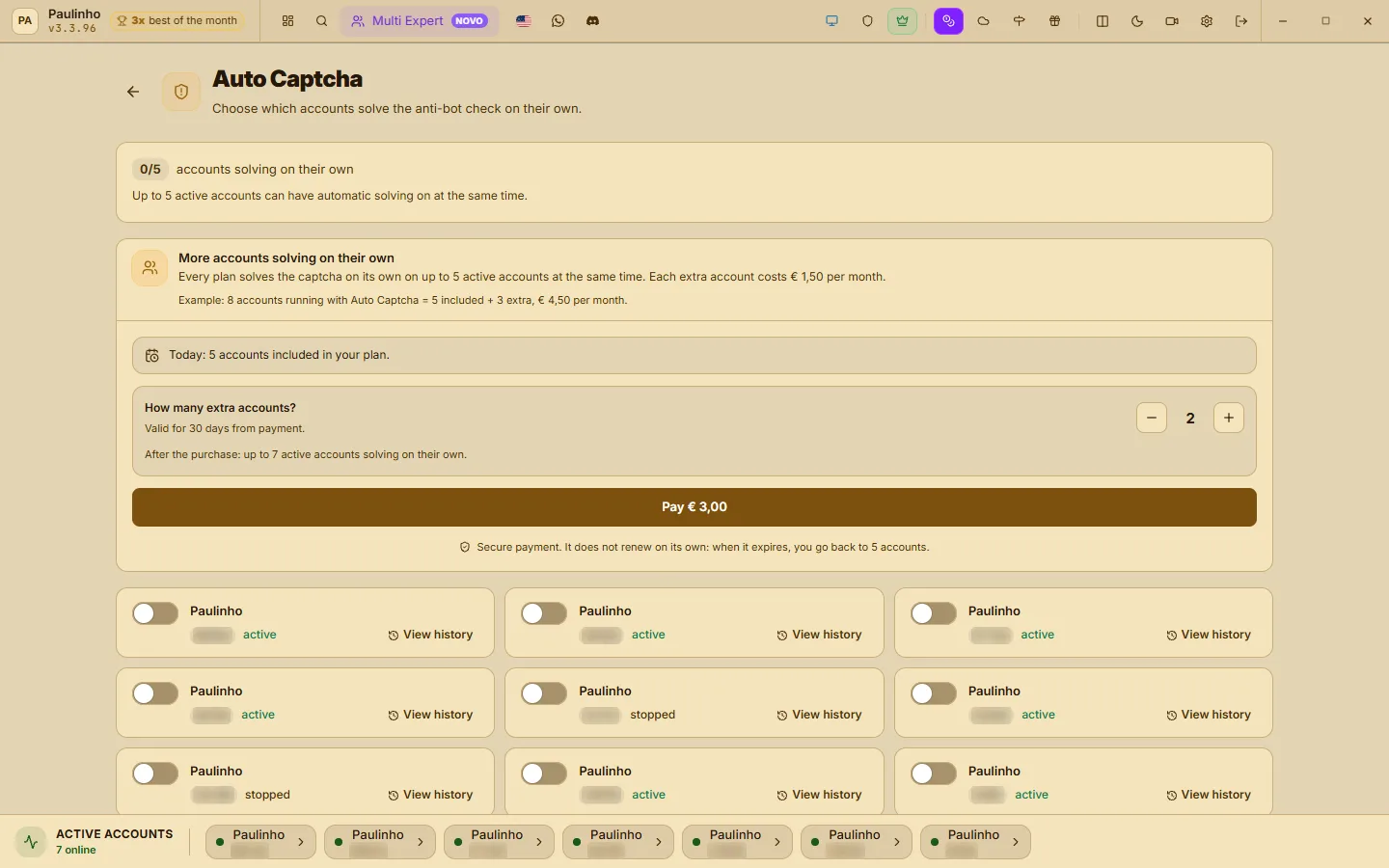
Pick several accounts at once
Press
Ctrl+Kand search for "Auto Captcha for all accounts". The screen shows one card per account, with the switch, the state ("active" or "stopped") and the "View history" shortcut. -
Follow the history
The account's Auto Captcha screen shows totals for "Today", "Last 7 days", "Last 30 days" and "Since the start", plus the list "Every captcha on this account", with the time it appeared, how long the account stayed stopped and when the app tried to solve it on its own.
-
Set up the alert
In Notifications > Captcha tab, choose "Repeat the alert" (once, 15 min, 30 min or 1 h), whether you want the sound alarm and whether you want to be told when the check is solved. On the recipients, tick the "Captcha" type.
What the screen looks like
What each option does
| Option | What it is for |
|---|---|
| Solve captcha automatically | The app tries to solve it and free the account on its own. Off, it only alerts you. |
| Account limit | Up to 5 active accounts solving on their own at the same time. A stopped account can stay ticked freely: it only counts toward the limit while it is running. |
| More accounts solving on their own | Extra monthly slots, bought on the Auto Captcha screen itself by PIX, card or euro. They do not renew on their own. |
| Repeat the alert | While the check is not solved, the alert comes back at this interval. |
Tips
- Turning on Auto Captcha carries more risk than regular use, and the app warns you about it before turning it on. If maximum safety is your priority, leave it off and solve from the alert.
- Pushing on with the check open sends nothing and draws attention to the account: solve it before doing anything else.
- The history keeps the last 90 days on this computer; solved captchas are also uploaded to your PS Evolution account.
Common problems
The Auto Captcha switch is locked.
The limit of active accounts solving on their own was reached. Turn it off on another active account or use "Buy more slots".
I clicked "I solved it" and the account is still stopped.
If you see "The check is still up", it was not solved: solve it in the account's browser and check again. If the game did not respond in time, wait a moment and check once more.
The link in the alert did not free the account.
The computer running the account must have Online Mode on (Settings > Sync PCs). Without it, the links have no one to answer them.
No captcha alert arrives on WhatsApp or Telegram.
No recipient has the "Captcha" type ticked. In the Captcha tab of Notifications, use "Tick Captcha on the first destination".
See also
Do not have PS Evolution yet?
The download is free: download it, create your account inside the app and try everything for 24 hours, no card.