 PS Evolution
How to dodge attacks in Tribal Wars: automatic troop dodge
Dodging means pulling your troops out of the village before the attack lands, so it hits an empty village. PS Evolution sends the troops, cancels the command at the right instant (the same mechanic as the cancel snipe) and they come back a few seconds after impact, at a random instant the attacker can't predict.
It is mainly for offensive villages or villages with little defense. It runs in the background, even with the screen closed. It requires an active Premium Account in the game.
Step by step
-
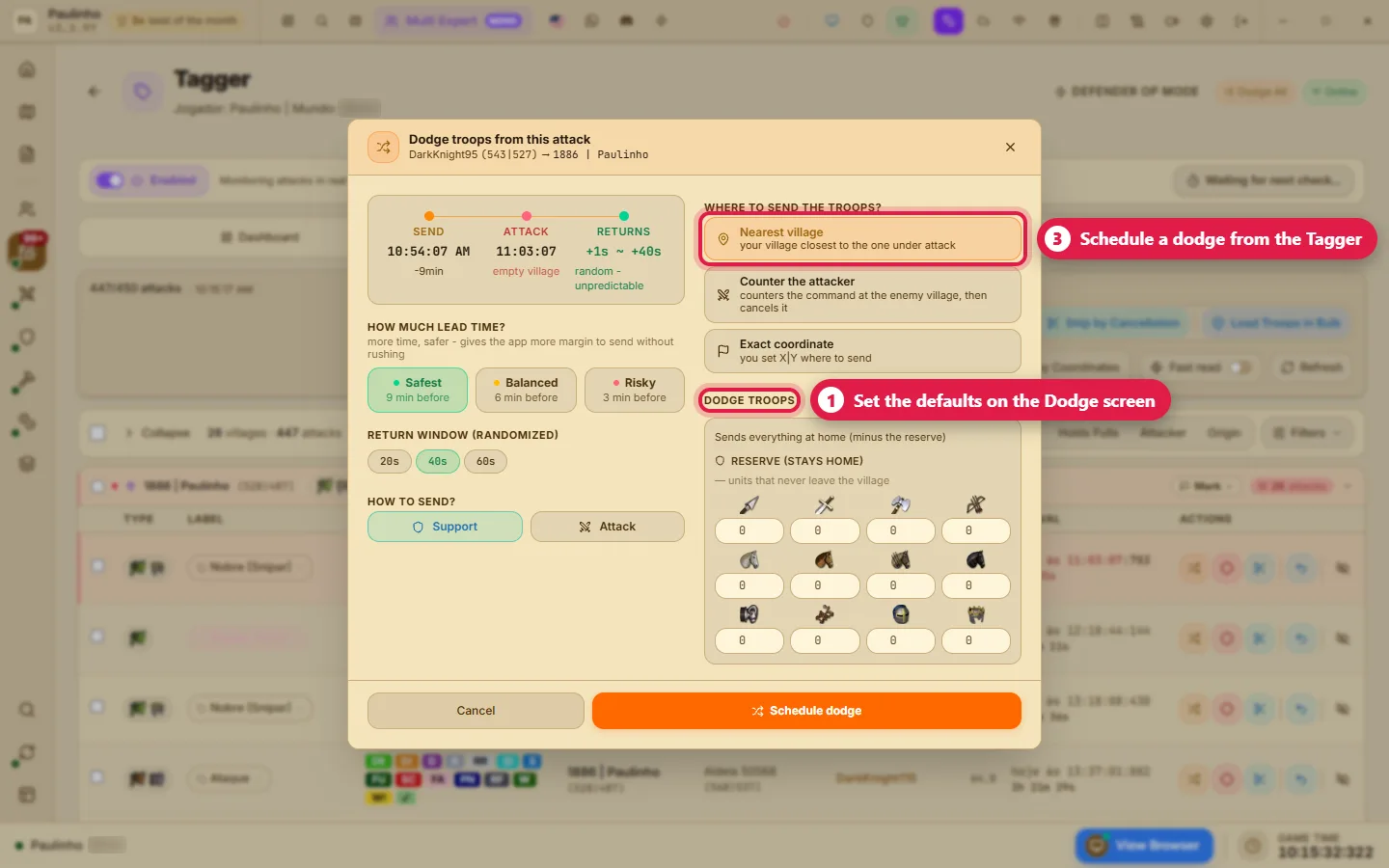
Set the defaults on the Dodge screen
Open Dodge Troops, Configuration tab. Under "Dodge Destination", pick "Nearest" (your closest village), "Counterattack" (the attacker's origin) or "Fixed coordinate", the command type and, under "Reserve Troops", what never leaves the village.
-
Check the timing
Under "Default timing", "Dodge with remaining (min)" is how long before arrival the troops leave, and "Return after arrival (s)" is the end of the return window (6 seconds minimum). The "World window" is read from the game. The worked example shows on the timeline whether the setup is safe.
-
Schedule a dodge from the Tagger
In the Tagger, Attacks tab, click "Dodge" on the attack row. Pick where to send them ("Nearest village", "Counter the attacker" or "Exact coordinate"), how to send them (Support or Attack), the lead time ("Safest", 9 min; "Balanced", 6 min; "Risky", 3 min) and the return window (20, 40 or 60 s). Click "Schedule dodge".
-
Dodge several at once
Check attacks and use "Dodge selected", or click "Dodge All" at the top of the Tagger. Attacks on the same village less than 30 seconds apart become a single dodge. "Cancel dodges" undoes all of them.
-
Or turn on automatic dodge
At the top of the Dodge screen, turn on "Automatic dodge": the app detects the attacks and dodges on its own. In Configuration, pick the village group, the lead time, how often to check and "Which attacks to dodge" (Large, Medium, Small, With ram, With noble, Scout).
-
Follow the queue and the logs
The Scheduled tab shows "To dodge" (waiting for the time) and "To cancel" (troops out, cancel armed), with the attack each dodge protects against, the troops and when they come back. You can edit a dodge. The Logs tab records destination, send and cancel.
What the screen looks like
What each option does
| Option | What it is for |
|---|---|
| Where to dodge to (automatic) | The order is: your nearest village, a barbarian village on the map (between 3 and 25 fields), striking back at the attacker's origin, and the safety coordinate. Each step only applies if the previous one doesn't work. |
| Strike back at the attacker's origin | In automatic mode it always goes out as an attack, never as support, so you don't hand troops to the enemy if the cancel fails. |
| Safety coordinate | Last resort: a distant, safe village of yours. |
| Tag the attack with [Desviado] in the game | After the game labels the command, the app adds the dodged tag to the end of its name. |
| Notify on WhatsApp | Alerts the contacts set up in the Tagger on every dodge. |
| Lead time | The ceiling is twice the world window, because the cancel happens halfway through the trip. Asking for more only makes the app delay the send. |
Tips
- More lead time is safer: it gives the app room to send without rushing if there is a send queue or a game reload.
- Be careful dodging when a nobleman lands: pulling your troops out can make it easier to lose the village if there is no defense. That is why "With noble" comes unchecked in automatic mode.
- The game doesn't reveal whether an attack is real or fake. The clue is the size of the command and the nobleman, scout or ram icon.
- When striking back by hand, prefer "Attack" over "Support".
Common problems
The dodge sent everything, even with a reserve set.
A dodge without its own reserve uses the reserve from the Dodge screen. Check "Reserve Troops" in Configuration and, in the Tagger dialog, the reserve field.
I see "No nearby village found".
Your nearest village must be far enough for the cancel to fit in the trip. Turn on the barbarian village, the strike back option, or fill in the safety coordinate so the app has alternatives.
I removed a dodge from the queue with the troops out. What happens?
The command is canceled right away and the troops come back, without the calculated timing.
Automatic dodge won't turn on.
Without an active Premium Account in the game the switch stays locked. Also check that you checked at least one type under "Which attacks to dodge".
See also
Do not have PS Evolution yet?
The download is free: download it, create your account inside the app and try everything for 24 hours, no card.