 PS Evolution
NT Cancel in Tribal Wars: how to send commands that cancel themselves
At the set time, each origin sends one command to each target and, a while later, the app cancels the command on its own. The enemy sees the attack incoming and has to react, but nothing lands and your troops never fight.
The time until the cancel respects the world's cancel limit, which the app reads from the game, keeping 1 minute of margin. Sends go out one at a time.
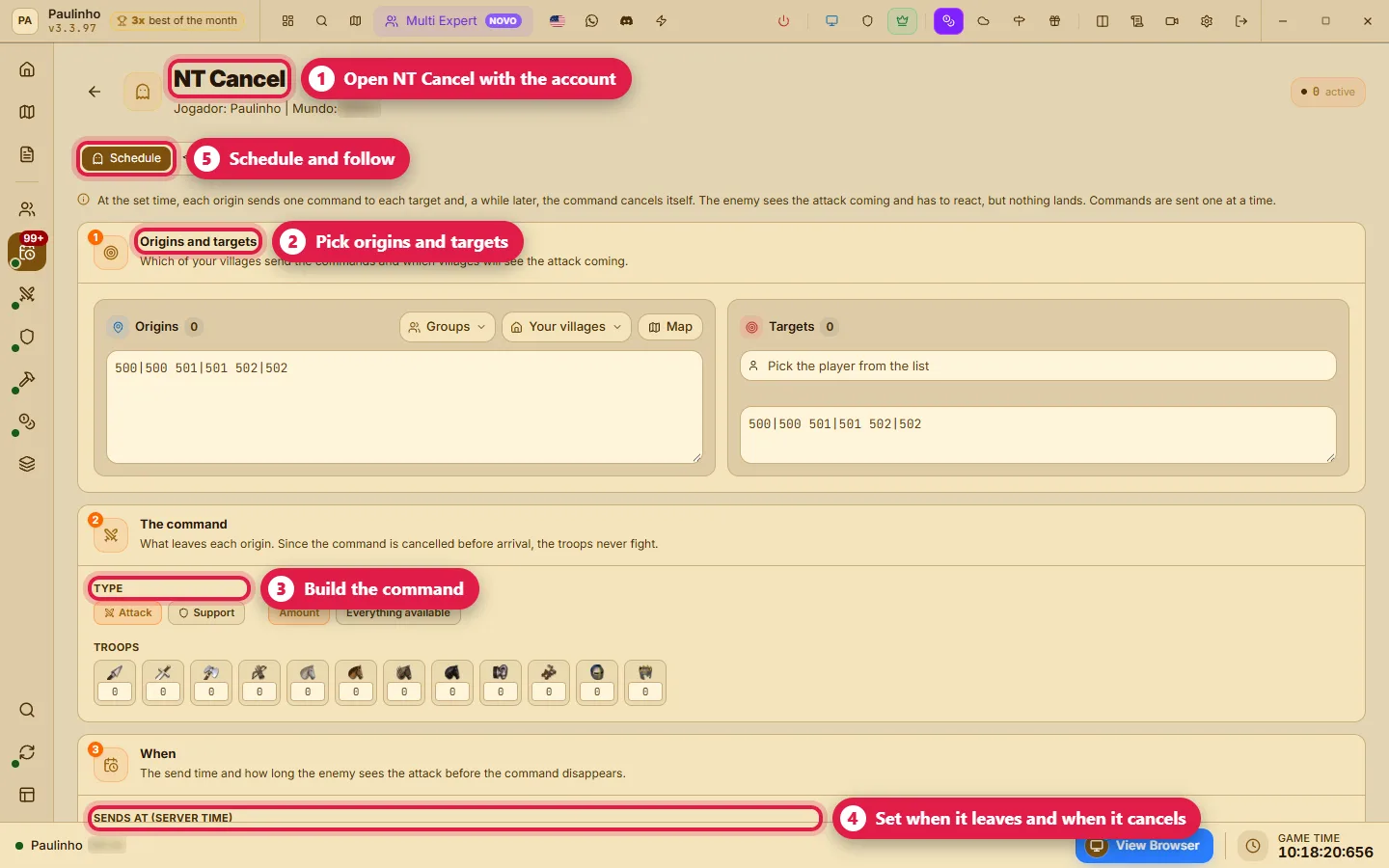
Step by step
-
Open NT Cancel with the account connected
Pick NT Cancel in the account sidebar. The account must be connected to schedule. The screen has the "Schedule", "Commands" and "History" tabs.
-
Pick origins and targets
Under "Origins and targets", paste the coordinates of your villages that send and of the villages that will see the attack coming. For origins, "Group..." brings in the villages of an in-game group.
-
Build the command
Under "Type", pick "Attack" or "Support". Under "Troop mode", pick "Amount" to type each unit, or "Everything available" for each command to take everything the village has at send time.
-
Set when it leaves and when it cancels
Under "Sends at (server time)", pick the date and time. Under "Cancel after", set how long the enemy sees the command; the world maximum shows in the label. The summary below shows how many commands go out (origins times targets).
-
Schedule and follow
Click "Schedule". In the "Commands" tab, each row shows the countdown to the send and to the cancel, with the state: "Waiting", "Sending", "Sent", "Cancelled", "Failed" or "Missed the time".
What each option does
| Option | What it is for |
|---|---|
| Cancel after | Minimum of 3 seconds. The maximum is the world's cancel limit minus 1 minute of margin. |
| Sends at | Must be at least 5 seconds in the future. It is the game server time. |
| Batch | Up to 200 commands per scheduling. With more than that, reduce the origins or the targets. |
Tips
- Farther origins keep the command visible longer. With travel that is too short, the app moves the cancel earlier so it happens before arrival.
- Removing a command that is already "Sent" cancels it in the game.
- "Clear finished" removes the ones that are done from the list.
Common problems
I see "Could not read this world's cancel limit".
Without that limit the command could reach the target, so the app does not schedule. Click "Try again" with the account connected.
The app warned that the command could not be cancelled.
Cancel the command by hand in the game, at the rally point, before removing it from the list.
I see "None of the origins is yours".
Origin coordinates must be villages of this account. Other players' origins are skipped.
See also
Do not have PS Evolution yet?
The download is free: download it, create your account inside the app and try everything for 24 hours, no card.