 PS Evolution
How to buy or renew a PS Evolution plan (card, PayPal or PIX)
You buy inside the app itself, on the Plans screen: you choose what you want to use, for how long and how to pay. The license activates as soon as the payment is confirmed.
Outside Brazil, you pay by international card in euro, through Stripe. PayPal and Revolut are also accepted: talk to support to pay that way. PIX and card through Mercado Pago are for Brazil, in reais.
The days left on your current plan are added to the new one, so renewing before it expires loses no time. The same screen lets you gift a friend and shows your purchase history.
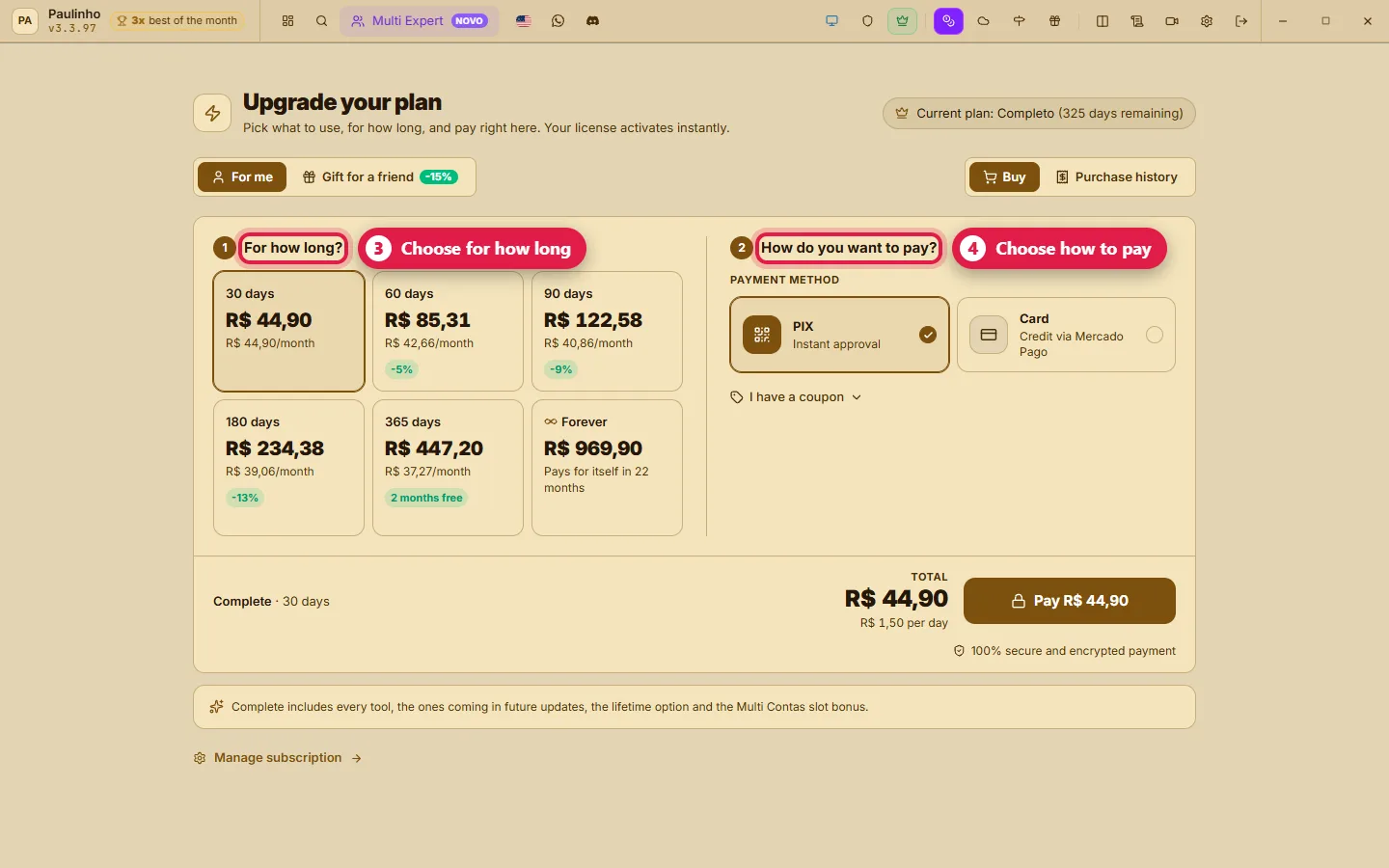
Step by step
-
Open Plans
Click your plan badge in the top bar, then "View plans" (or "Renew now", if the license is close to expiring). Without an active plan, the app opens straight on this screen.
-
Choose what to use
Under "What do you want to use?", choose Complete (every tool) or "Build your own" and tick only the tools you use.
-
Choose for how long
Under "For how long?", choose Monthly, Two-month, Quarterly, Semiannual, Annual or Lifetime. The summary on the side shows the total and the discounts.
-
Choose how to pay
Under "How do you want to pay?", pick the currency ("Euro (€)" or "Brazilian real (R$)") and the method. In euro, the method is "International card" (through Stripe). In reais, it is "PIX" (instant approval) or "Card" (credit through Mercado Pago), both for Brazil. If you have a coupon, click "I have a coupon".
-
Pay
Click Pay. With a card, the payment page opens in your browser. With PIX, scan the QR Code or copy the copy-and-paste code. The screen stays on "Awaiting payment" and, once confirmed, shows "Payment Confirmed!".
What each option does
| Option | What it is for |
|---|---|
| Renew automatically | A subscription that charges on its own every cycle, cheaper than a one-time payment. You can cancel anytime. |
| Pay in installments | On the lifetime plan: a down payment plus installments at no extra cost. While you pay, the license is monthly; lifetime is unlocked with the last installment. |
| Gift for a friend | Buys a license for another account, with a discount. Your friend needs a PS Evolution account; enter their email. |
| Purchase history | Tab with all your purchases, gifts and activations. |
| Early renewal | Renew before it expires and get a discount already applied to the prices. Coupons do not stack with it: applying a coupon replaces that discount. |
Tips
- Every plan includes as many registered accounts as you want, every script, updates and support. The number of accounts connected at the same time depends on the plan and shows in the summary.
- In euro, payment is by international card only, and some coupons do not apply to euro. To pay with PayPal or Revolut, talk to support before buying.
Common problems
I paid and the license did not activate.
With PIX, click "Verify payment now". Without an active plan, use the "I already paid" button at the top of the screen. Before paying again, check the "Purchase history" tab.
The card page closed before I finished.
Click "Choose another payment method" and try again.
My coupon does not work.
Check that it applies to the chosen currency (some coupons do not apply in euro) and to the plan. On early renewal, the coupon replaces the renewal discount, it does not stack.
I already have a subscription with automatic renewal and want to change plans.
Subscribers renew through the subscription itself. Use "Manage subscription" on the Plans screen or open My subscription.
I'm not in Brazil. Can I pay with PayPal?
Yes. PayPal and Revolut are accepted by talking to support. In the app, the option for outside Brazil is the international card in euro, through Stripe.
See also
Do not have PS Evolution yet?
The download is free: download it, create your account inside the app and try everything for 24 hours, no card.