 PS Evolution
How to recruit nobles automatically in Tribal Wars
Recruit Nobles trains nobles in the villages you choose until each one hits its goal. When resources run short, it can pull them from donor villages through the market.
It is meant for having nobles ready before an operation. If you want the app to conquer as well, use Ennoble Villages, which trains its own nobles.
The game only trains a nobleman in a village with an academy.
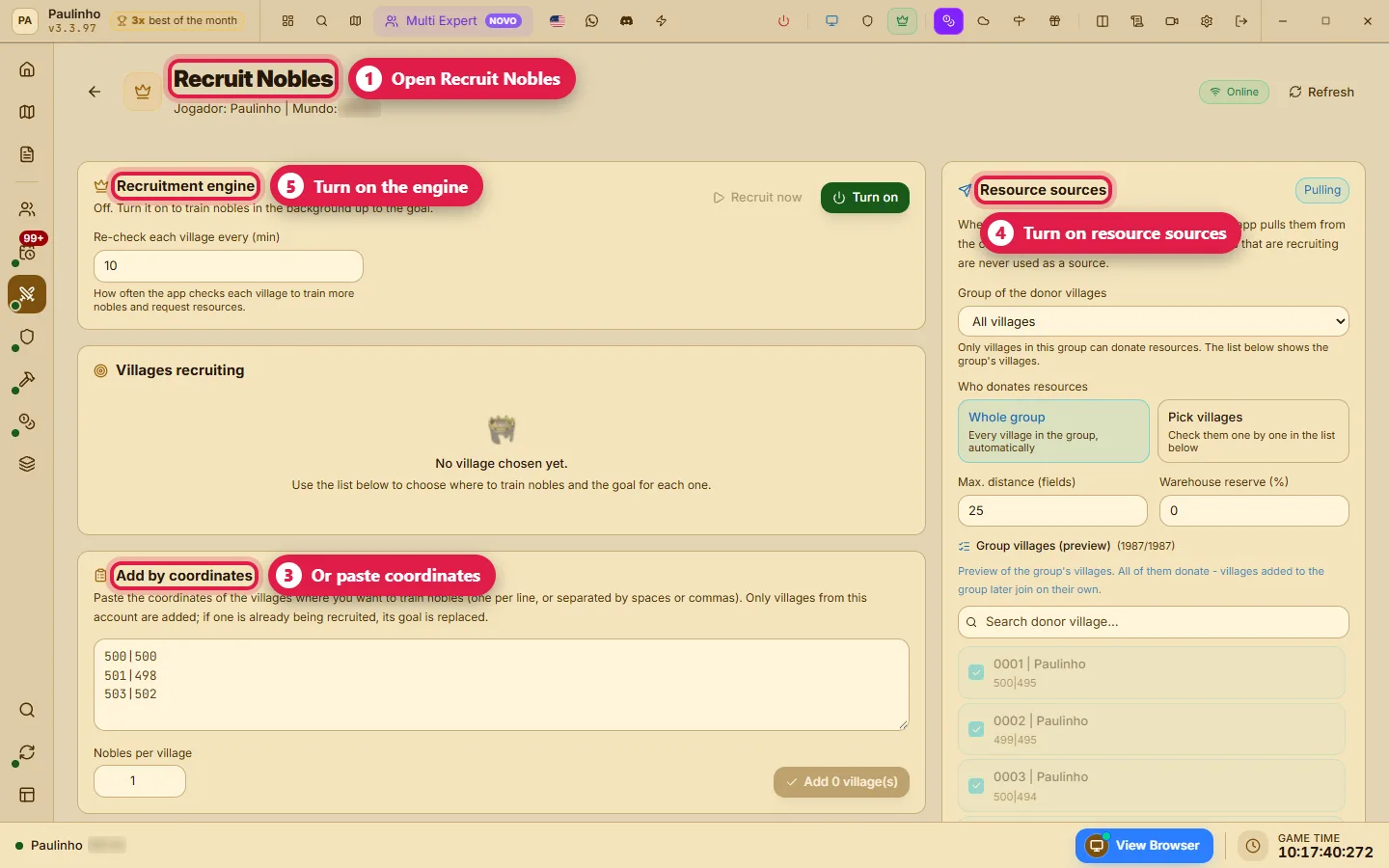
Step by step
-
Open Recruit Nobles
Pick Recruit Nobles in the account sidebar, with the account connected.
-
Pick the villages and the goal
Under "Add villages", filter by group or search by name and add the villages. On each one, set the "Goal": how many nobles you want there. "Goal for all" applies the same number to all of them at once.
-
Or paste coordinates
Under "Add by coordinates", paste the villages (one per line, or separated by spaces or commas) and set "Nobles per village". Only villages of this account go in; if one is already being recruited, its goal is replaced.
-
Turn on resource sources
Under "Resource sources", choose who donates: "Whole group" (every village in the group, including ones added later) or "Pick villages". Set the max distance, the warehouse reserve (%) and the interval between requests. Villages being recruited never donate.
-
Turn on the engine
Under "Recruitment engine", click "Turn on". Under "Re-check each village every (min)", set how often the app checks each village. For a pass right now, use "Recruit now".
What each option does
| Option | What it is for |
|---|---|
| Goal reached | The village already has the requested nobles (counting those in training). |
| Training | A nobleman is being trained. |
| Waiting | Resources or a slot are missing; the reason shows next to it, such as busy merchants or donors too far away. |
| Queued | The village is waiting for its turn in the pass. |
Tips
- The "Logs" section shows how much of each resource was pulled and how much was missing.
- With the warehouse reserve above 0%, each donor keeps that share for itself and sends the rest.
Common problems
The village is always "Waiting".
Look at the reason next to the status, for example "4 without free merchants" or "2 beyond the 25-field distance". Raise the max distance, pick other donors or wait for the merchants to come back.
A pasted coordinate did not go in.
Only villages of your own account go in. The others are listed as not being a village of this account.
See also
Do not have PS Evolution yet?
The download is free: download it, create your account inside the app and try everything for 24 hours, no card.