 PS Evolution
How to set up Auto Farm in Tribal Wars with PS Evolution
Auto Farm sends the game's Loot Assistant attacks for you, in cycles, from the villages of a group. It uses the assistant's own A and B models, picks the model by the color of the target's last report, and can also run cultivation, break walls and use the C button.
The game requires an active Premium Account for the Loot Assistant. Without it, the screen opens and you can set everything up, but the farm won't turn on or run. The account also needs a connected session in the app.
Step by step
-
Open the account and connect the session
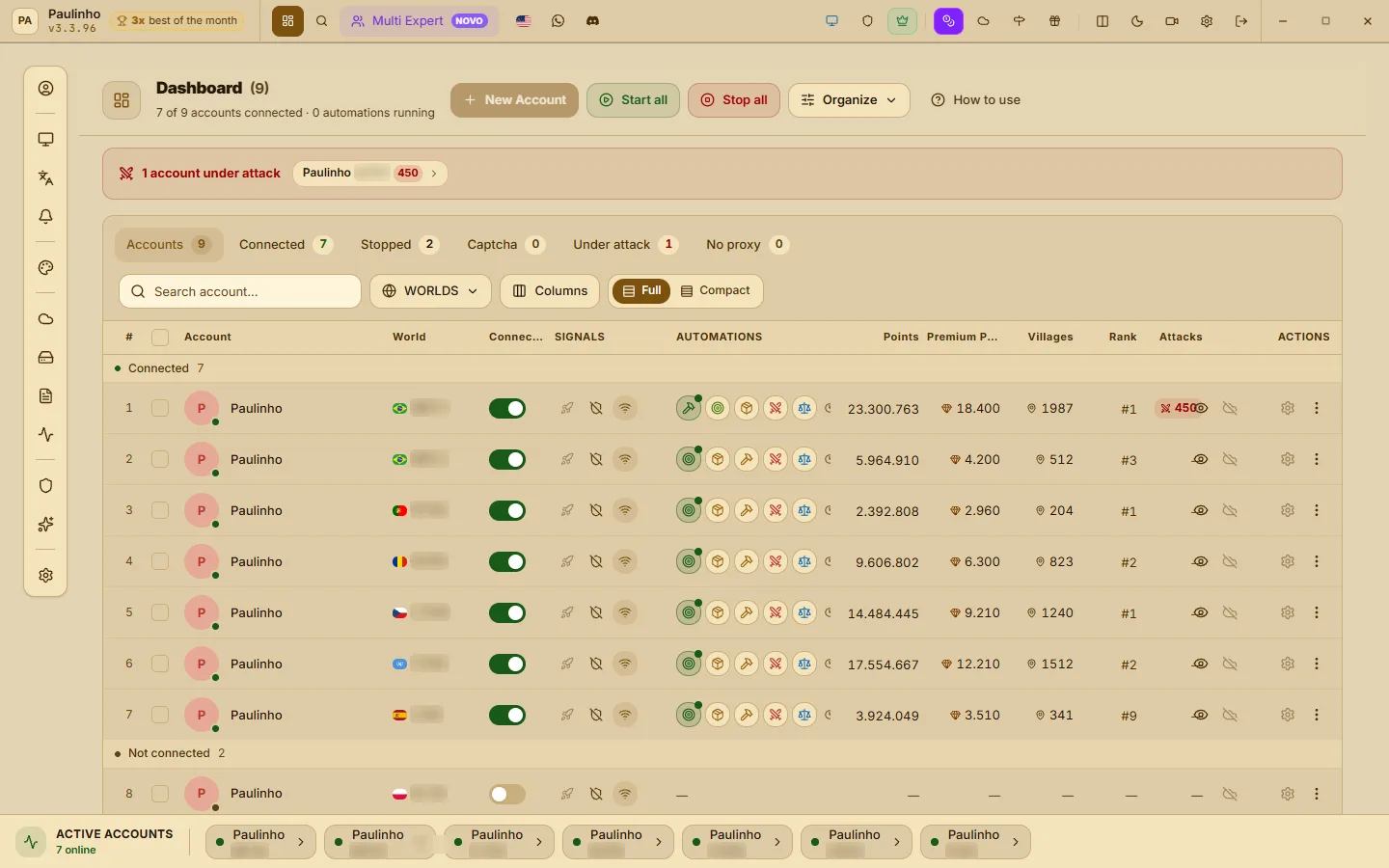
On the accounts screen, click the account that will farm. If you see "Session Offline", click "Connect Session Now" and wait for the game to load: the farm needs an active session to read your villages and groups.
Open the account and connect the session -
Open Auto Farm
In the account sidebar, click Auto Farm. You can also find it with the tool search (
Ctrl+K) by typing "farm".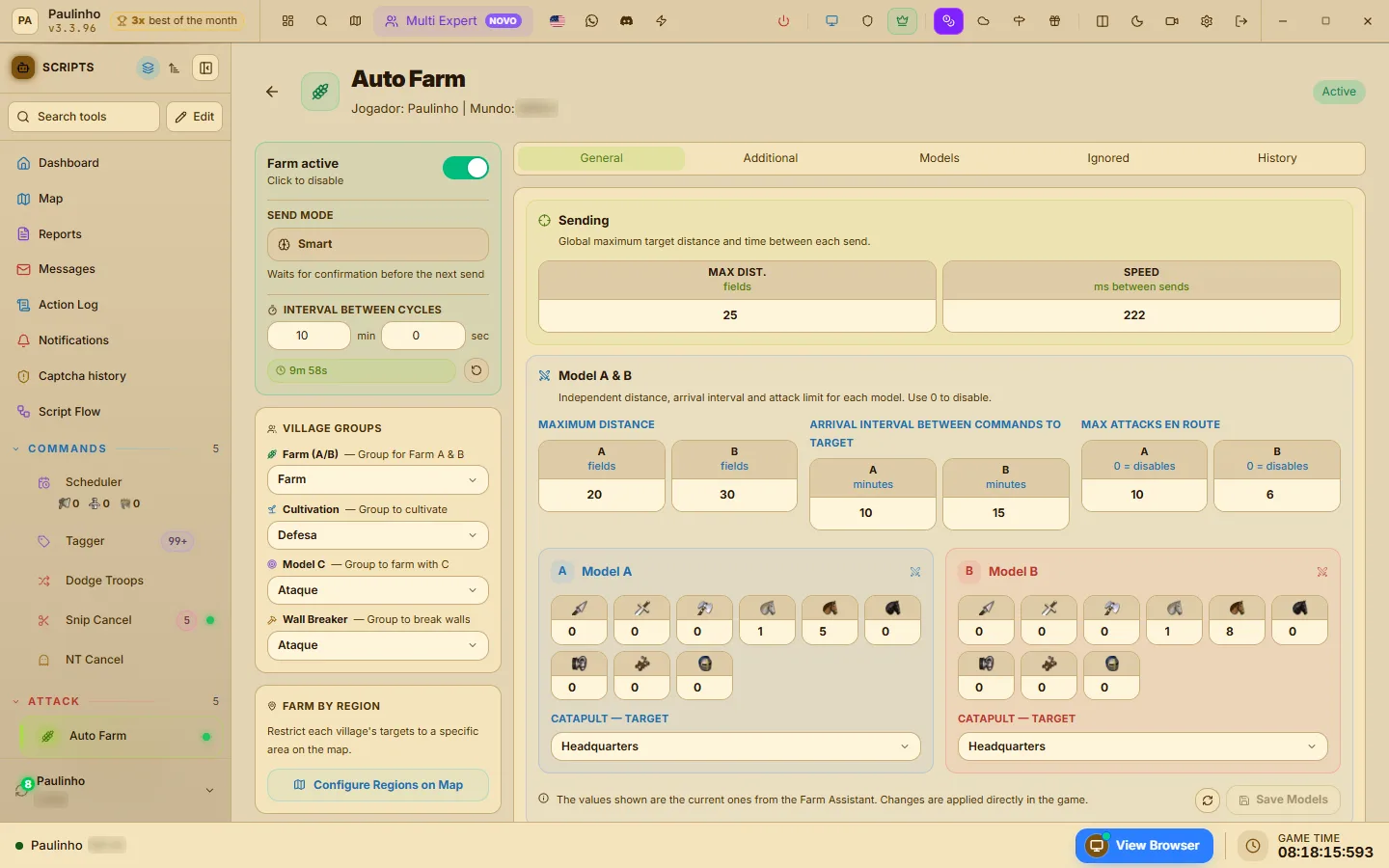
Open Auto Farm -
Pick the village groups
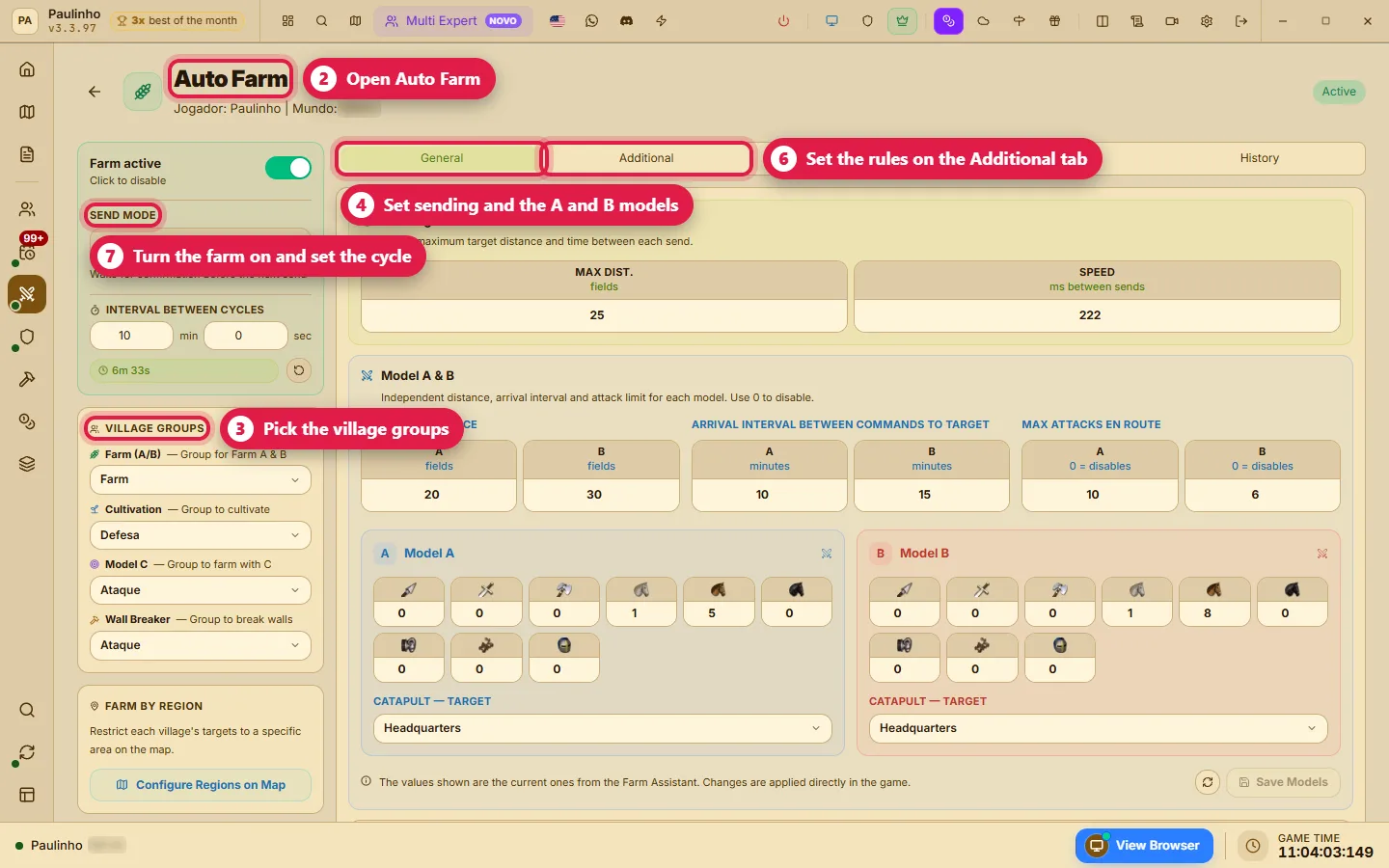
In the "Village groups" card, choose which game group sends each type of attack: "Farm (A/B)", "Cultivation", "Model C" and "Wall Breaker". "All" uses every village. The best setup is a group in the game with only the offensive villages that will farm.
-
Set sending and the A and B models
On the "General" tab, under "Sending", set the targets' "Max dist." (default 25 fields) and the "Speed" in ms between sends (default 222). Under "Model A & B", set for each model the max distance, the "Arrival Interval between Commands to target" (default 10 minutes) and "Max Attacks En Route" (default 10; 0 turns the model off). Right below are the troops for models A and B: they are the Loot Assistant's own troops and are saved straight to the game when you click "Save Models".
-
Set the target score range
Under "Target mapping", "Minimum score" and "Maximum score" (default 0 to 1000) decide which villages count as targets. Raise the maximum if you want to farm bigger barbarian villages.
-
Set the rules on the Additional tab
Under "What to do based on the target's last report", choose the action for Blue (empty), Yellow (partial) and Red (had defense): "Farm", "Scout", "Break Wall" or "Ignore". Out of the box, blue farms and yellow and red go to the wall breaker. Also set the "Troops to keep at home (reserve)" and the "Attack model priority order".
-
Turn the farm on and set the cycle interval
In the top card, choose the "Send mode" and the "Interval between cycles" (default 10 minutes). Then click the switch until you see "Farm active". With the farm on, the reload button next to the countdown starts the next cycle right away.
-
Follow it in History
The "History" tab shows each cycle with origins, targets, attacks, failures and the success rate. When a cycle sends nothing, it shows "Why this cycle sent nothing".
What each option does
| Option | What it is for |
|---|---|
| Send mode | "Smart" waits for the server's confirmation before the next send. "Aggressive" fires without waiting for the reply. When you switch, the app reloads the game page so the new mode takes effect. |
| Interval between cycles | Time between one farm cycle and the next, in minutes and seconds. Default: 10 minutes. |
| Farm by Region | Limits each village's targets to an area drawn on the map. Click "Configure Regions on Map". |
| Detect new barbarian villages | Adds new barbarian villages to the farm group on its own as they show up. |
| Respect scheduled commands | A village with a command in the Scheduler stops farming ("Stop immediately") or only sends loot runs that come back before the command ("Farm until the command", with a minimum margin of 5 minutes; default 10). |
| Auto adjust A and B troops | Works out how many troops each attack takes. You pick which units it can use (light cavalry, heavy cavalry, mounted archer) and you can turn on "Send a scout along". |
| Prioritize full villages | Hits targets with full resources first, within the field limit you choose, then follows the order by distance. |
| Cultivation (Models tab) | Periodic attacks with troops and catapult target buildings that you choose. Default: every 60 minutes, up to 20 fields, 1 attack per target. |
| Wall Breaker (Models tab) | Troops per wall level for yellow and red targets, with the "Light", "Medium" and "Heavy" shortcuts and the "Default" button. |
| Model C (Models tab) | Uses the Loot Assistant's C button, with max distance, "Max Wall" and "Minimum per origin village". The C units are checked on the General tab and saved with "Save C". |
| Ignored | "Targets" are coordinates the farm never attacks. "My villages" are your own villages that never send farm attacks. |
Tips
- Start with "Smart" mode and the default 10 minute interval. Only raise the speed after History shows the cycles finishing without failures.
- If the A and B model troops are empty in the game, the farm has nothing to send. Check "Model A & B" and click "Reload from game" to see the current values.
- To skip an ally's village or a barbarian you plan to noble, paste the coordinate on the "Ignored" tab under "Targets".
Common problems
I see "Premium Account required" and the farm won't turn on.
Auto Farm uses the Loot Assistant, which the game only unlocks with a Premium Account. Activate the Premium Account in the game and click "Check again" on the same screen.
The cycle runs but sends no attacks.
Open the "History" tab and read "Why this cycle sent nothing". The most common causes are an empty group, targets beyond the max distance, Model A and B with 0 in "Max Attacks En Route", or A and B models with no troops in the game.
Model C is on and sends nothing.
Model C only runs with a valid group. If the "Model C" selector in the groups card is on "Select...", pick a group.
A captcha showed up and the farm stopped.
Solve the check in the game window. The farm resumes on its own once it is solved.
The screen asks me to connect the session.
The farm needs the game session open in the app. Click "Connect Session Now". If the account won't connect, see the tutorial on accounts that don't connect.
See also
Do not have PS Evolution yet?
The download is free: download it, create your account inside the app and try everything for 24 hours, no card.