 PS Evolution
Tribal Wars mass scavenging bot: how to set it up
Bulk Scavenge sends every village in a group scavenging at once, through the game's own mass scavenging screen, and repeats on its own at the interval you pick.
The game's mass scavenging requires an active Premium Account, and the world must have scavenging. Without a Premium Account, use Individual Scavenge, which scavenges village by village.
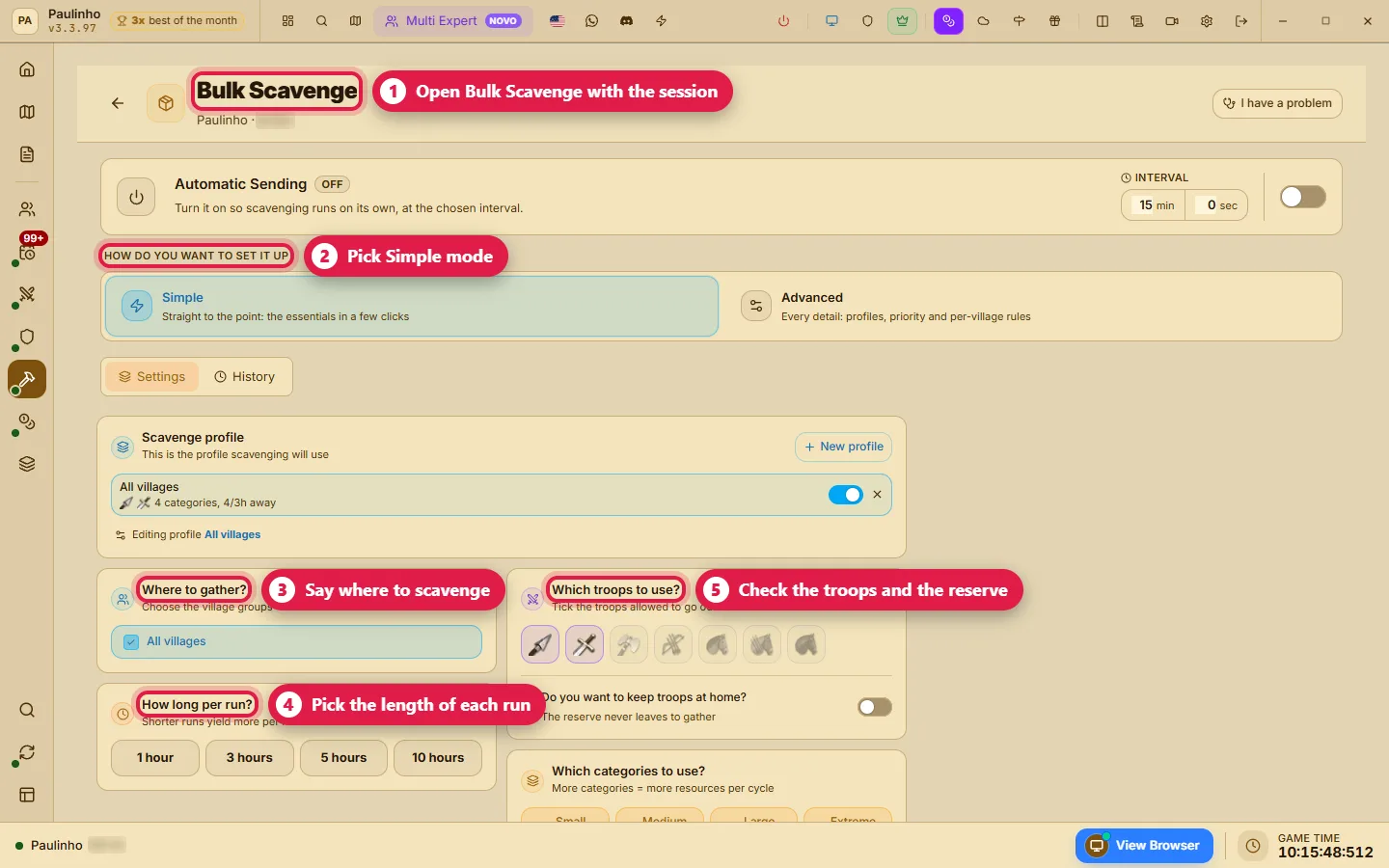
Step by step
-
Open Bulk Scavenge with the session connected
In the account sidebar, click Bulk Scavenge. The game session must be connected for the app to load your groups.
-
Pick Simple mode
Under "How do you want to set it up", stay in "Simple" mode for the essentials in a few clicks. "Advanced" shows profiles, priority and per village rules.
-
Say where to scavenge
Under "Where to gather?", check the village groups that will scavenge. With no group checked, scavenging has no villages.
-
Pick the length of each run
Under "How long per run?", pick a shortcut: 1 hour (little loot, troops come back fast, ideal in war), 3 hours (day to day), 5 hours or 10 hours (maximum volume, when you don't need the troops soon). Shorter runs yield more per hour.
-
Check the troops and the reserve
Under "Which troops to use?", check the units that can go out (spear fighter and swordsman come checked by default). Under "Do you want to keep troops at home?", enter how many of each troop stay home: the reserve never goes scavenging.
-
Turn on the categories
Under "Which categories to use?", leave "Small Scavenge", "Medium Scavenge", "Large Scavenge" and "Extreme Scavenge" on. More categories mean more resources per cycle.
-
Turn on Automatic Sending
At the top of the screen, turn on "Automatic Sending" and set the interval in minutes and seconds (default 15 minutes). The text changes to "Scavenging on its own every", in the villages of the enabled profiles.
-
Check the diagnostics
Click "I have a problem" to open the "Bulk Scavenge Diagnostics". It checks the session, automatic sending, troops, categories and the last run, with a button to fix each pending item.
What each option does
| Option | What it is for |
|---|---|
| Scavenge rules | "Respect scheduled commands" skips villages with a command in the Scheduler. "Skip villages under attack" keeps the troops home when an attack is on the way. |
| Unlock locked scavenges | Opens categories that are still locked on its own, sending 1 troop. Runs every 30 minutes, before scavenging, and only works with Automatic Sending on. |
| Gathering profiles (Advanced) | Each profile scavenges with its own settings and its own groups. Use "New profile" and adjust the priority order. |
| How long away? (Advanced) | Separate duration for "Offensive village" and "Defensive village", based on the dominant troop type. Default: 4 hours and 3 hours. |
| How to distribute across categories? (Advanced) | "Balanced" makes every category return together at the chosen time. "Prioritize largest" fills from Extreme down to Small and may leave the smaller ones empty. |
| "Plus": maximum daily efficiency (Advanced) | Adjusts the length of each send so the troops come back by the end of the day: "Every day" (until 23:58) or "Until specific date". |
| Keep and Max (Advanced) | "Keep" is the reserve at home. "Max" is the cap for each unit per send; empty sends all of them. |
| Don't scavenge after date/time and Pause between hours (Advanced) | Stop scavenging from a given moment or within a time range, always in the game server's time. |
| Per Village (Advanced) | Custom settings for each village. An empty field uses the profile's default. |
Tips
- If you are away all day, 5 or 10 hours per run avoids troops sitting idle at home. If you play actively, 1 to 3 hours yields more per hour.
- History keeps the last 10 runs and shows why each village was skipped. Use "Filter by reason" to find the problem fast.
Common problems
History says "The game mass scavenging requires a Premium Account".
The mass scavenging screen only exists with an active Premium Account in the game. Activate the Premium Account or use Individual Scavenge.
Scavenging doesn't run on its own.
"Automatic Sending" at the top of the screen is off. Turn it on and check the interval.
I see "No active scavenging profile" or "Scavenging profile without troops, category or time".
Turn the profile on under "Scavenge profile" and make sure it has at least one troop, one category and one time.
A village shows "No rally point built".
Scavenging leaves from the rally point. Build a rally point in that village.
Category unlocking never happens.
Unlocking only runs together with Automatic Sending. Turn on Automatic Sending at the top of the screen.
See also
Do not have PS Evolution yet?
The download is free: download it, create your account inside the app and try everything for 24 hours, no card.