 PS Evolution
 Safe Mode: how to make actions slower and more careful
Safe Mode makes every action on the account slower and more careful: commands go out one at a time with longer waits, the number of actions per minute is capped, there is a pause between different scripts, and minting can join the queue instead of running in parallel.
You turn it on account by account. Each setting can be adjusted per account, or you save a model and apply it to several accounts at once.
Step by step
-
Turn it on quickly from the top bar
Click the Safe button in the top bar. A list of your accounts opens: click an account to turn its Safe Mode on or off. The number next to "Safe" shows how many accounts have the mode on.
-
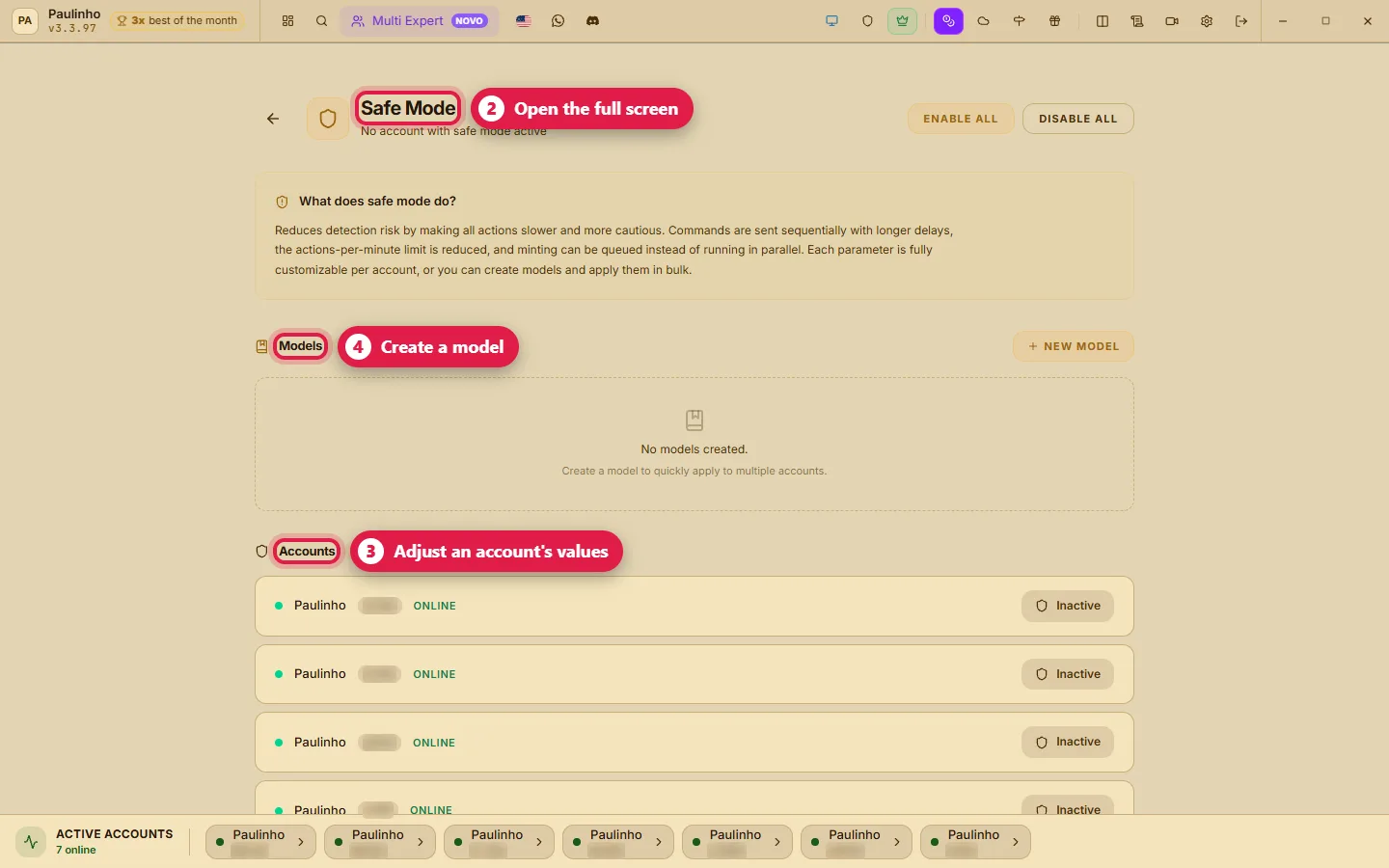
Open the full screen
In the same list, click Configure. The "Safe Mode" screen shows every account, with the "Activate all" and "Deactivate all" buttons at the top.
-
Adjust an account's values
In the "Accounts" list, set the account to "Active" and click its name to open the settings. Set the "Delay between commands" (minimum and maximum), the "Action limit", the "Gap between scripts" and "Sequential minting". Changes are saved right away.
-
Create a model
Under "Models", click New model, give it a name (for example "Careful") and adjust the same values. Click "Create model". You can also save an account's values as a model with the "Save as model" icon next to it.
-
Apply the model to several accounts
On the model card, click Apply to accounts, tick the accounts (or use "All") and confirm with "Apply to". Safe Mode is turned on automatically on the chosen accounts.
What each option does
| Option | What it is for |
|---|---|
| Delay between commands | Wait time between each action sent to the game, picked at random between the minimum and the maximum. Default: 2 to 5 seconds. |
| Action limit | Maximum number of commands allowed per minute. Default: 15 per minute. |
| Gap between scripts | Pause between runs of different scripts. Default: 5 to 10 seconds. |
| Sequential minting | On, minting joins the queue with the other scripts ("In sequential queue"); off, it runs in parallel. |
| Restore defaults | Icon next to the account that resets its values to the defaults. |
Tips
- With the account active and collapsed, its row shows a summary of the values (delay, per-minute limit and gap), so you can check without opening it.
- Higher values make the account slower: farming, building and commands take longer to go out. If you need speed for an operation, turn the mode off on that account only.
Common problems
I don't see the "Safe" button in the top bar.
It only shows with an active plan. Without a plan, renew under Plans and the button comes back.
I clicked the account name and the settings did not open.
The settings only open with Safe Mode active on the account. First click the "Inactive" button on its row so it turns "Active".
My commands are going out too slowly.
Check whether the account has Safe Mode active, then lower the "Delay between commands" or raise the "Action limit". For a command with a set time, consider turning the mode off on that account.
See also
Do not have PS Evolution yet?
The download is free: download it, create your account inside the app and try everything for 24 hours, no card.