 PS Evolution
Siege Poker in Tribal Wars: how to play the event automatically
Siege Poker plays the event on its own on each account: it picks the best play of each hand, takes the best flag from the shop and moves on to the next castle while there are War Horns. Then it waits for the interval and comes back to use the War Horns that refilled (one per hour, up to 10).
Refilling War Horns with Premium Points is optional and comes turned off.
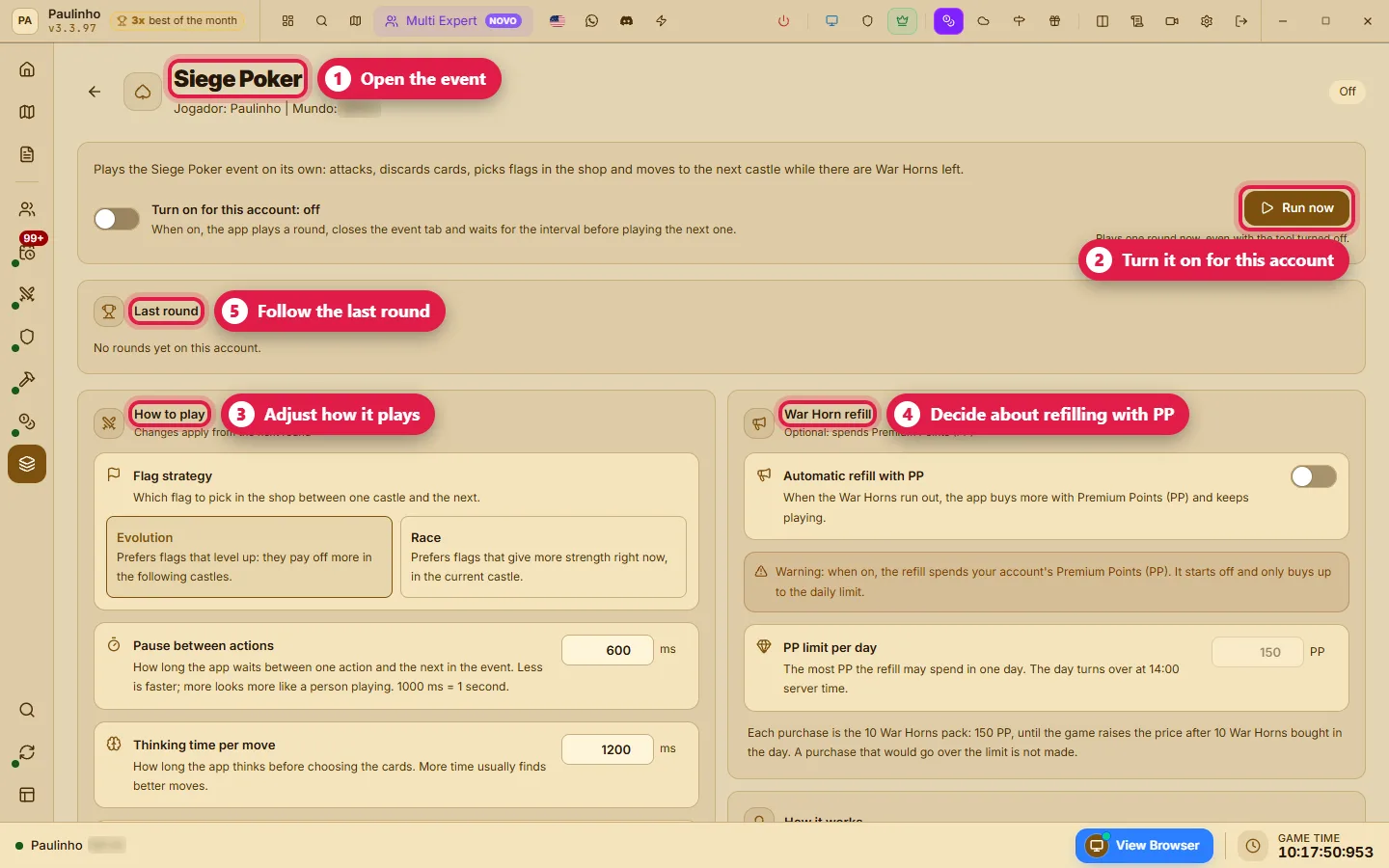
Step by step
-
Open the event
In the account sidebar, click Events and then "Siege Poker". The game session must be open.
-
Turn it on for this account
Under "Turn on for this account", flip the switch. When on, the app plays a round, closes the event tab and waits for the interval to play the next one. "Run now" plays a round right away, even with the tool turned off.
-
Adjust how it plays
Under "How to play", pick the "Flag strategy", the "Pause between actions", the "Thinking time per move", the "Interval between rounds" and the "Maximum time per round". Changes apply from the next round.
-
Decide about refilling with PP
Under "War Horn refill", "Automatic refill with PP" buys the pack of 10 War Horns (150 PP) when they run out, up to the "PP limit per day". The day turns over at 14:00 server time, and a purchase that would go over the limit is not made.
-
Follow the last round
"Last round" shows the War Horns left at the end, the PP, today's use and the total spent on refills, the record and "Why it stopped". "History" keeps every round.
What each option does
| Option | What it is for |
|---|---|
| Strategy: Evolution | Prefers flags that level up and pay off more in the following castles. |
| Strategy: Race | Prefers flags that give more strength right now, in the current castle. |
| Pause between actions | Wait between one action and the next, in ms (600 by default). More looks closer to a person playing. |
| Thinking time per move | How long the app thinks before picking the cards (1200 ms by default). More time usually finds better plays. |
| Pause when a castle is lost | If a castle is lost, the app stops and waits for you to click "Run now". |
| Interval between rounds | From 5 to 1440 minutes (60 by default). |
| Maximum time per round | From 1 to 240 minutes (30 by default). The round stops on its own after that, even with War Horns left. |
| PP limit per day | The most the refill can spend in a day (150 PP by default). |
Tips
- With refill off, no Premium Points are spent: the app only plays the War Horns you already have.
- The War Horn price is checked before each purchase; the game raises the price after 10 War Horns bought in a day.
Common problems
The status says "Event not active on this world".
The event is not running on that world right now. The app tries again when the session restarts; if the event just started, click "Run now".
It stopped with "anti-bot check (captcha)".
Solve the captcha on the account. Then the app goes back to playing.
It shows "Paused: a castle was lost".
The "Pause when a castle is lost" option is on. Click "Run now" or turn it off and on again.
It shows "Waiting for another tool of the account to finish".
Another tool is using the account. The round starts as soon as it finishes.
See also
Do not have PS Evolution yet?
The download is free: download it, create your account inside the app and try everything for 24 hours, no card.