 PS Evolution
How to set up a proxy per account in PS Evolution (and buy proxies in the store)
A proxy is a different internet address for the account to go out through. With a single account, or with accounts in different worlds, you do not need one. With more than one account in the same world, each extra account needs its own proxy: several accounts in the same world going out through the same IP can get banned.
You can add proxies you already have or buy ready, tested proxies in the app's store, delivered instantly.
Step by step
-
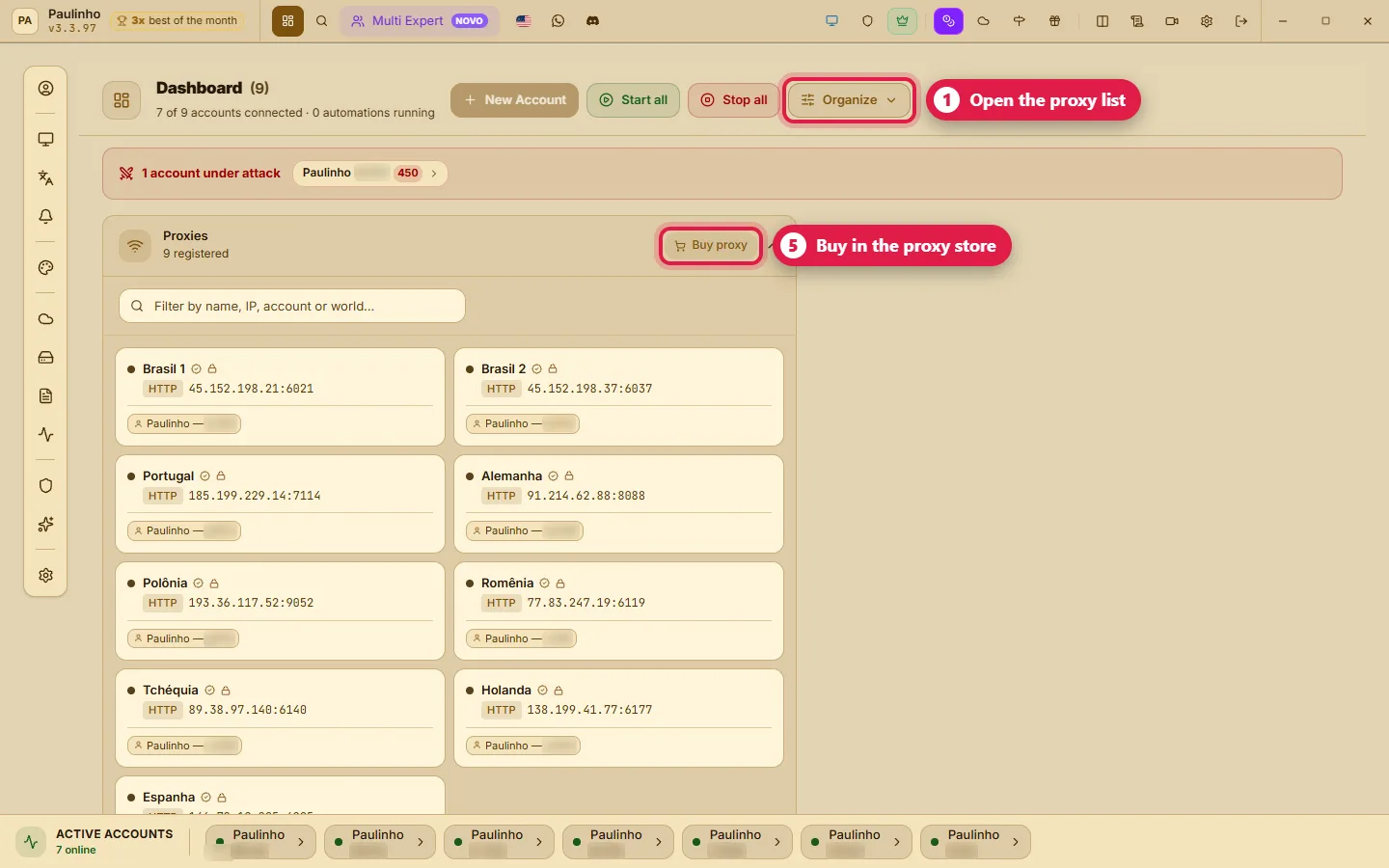
Open the proxy list
On the Dashboard, click "Organize" > "Proxies". The panel shows your registered proxies and which accounts use each one.
-
Add your own proxy
Click "Add Proxy". Paste one or more proxies in the paste field, one per line, in the format
host:port:user:pass, or fill in "Name", "Host", "Port", "Protocol" (http, https or socks5) and, if there is one, username and password. Click "Save". -
Test before you use it
Click "Test connection" on the proxy. The test runs against the world of the account using the proxy and shows "Tested against ..." or the error.
-
Link the proxy to the account
On the account row, click the "Configure" gear and pick the proxy in the "Proxy" section (you can filter by name, IP, account or world). Save and start the account again. For a new account, you pick the proxy right in the account creation window.
-
Buy in the proxy store
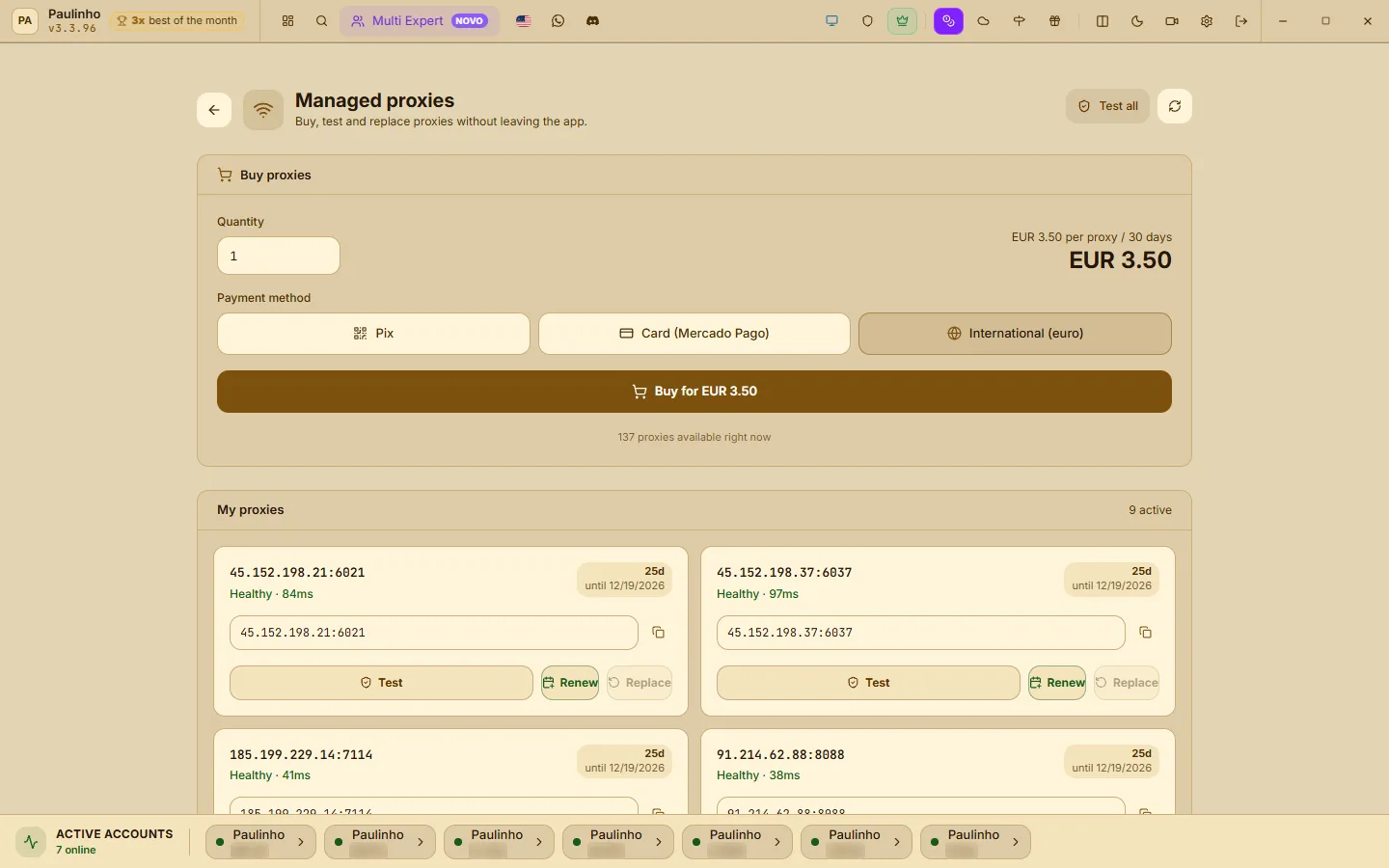
In the proxy panel, click "Buy proxy" (or search "Proxies" with Ctrl+K). In "Buy proxies", choose the "Quantity", the payment method ("Pix", "Card (Mercado Pago)" or "International (euro)") and click "Buy for ...". With Pix, delivery is automatic as soon as the payment clears.
Buy in the proxy store -
Track, replace and renew
In "My proxies", each proxy shows its health (Healthy, Slow, Offline or Not tested) and the days left. "Test" and "Test all" check them now. If the test fails, "Replace" requests a substitute, and the accounts that used the old one switch to the new one on their own. "Renew" extends the validity while keeping the same addresses.
What each option does
| Option | What it is for |
|---|---|
| No proxy | The account goes out through this computer's IP. Fine for your main account and for accounts in different worlds. |
| Managed proxy | Bought in the store: one account per proxy. The username and password are never shown; the app does the connecting. |
| Your own proxy | Can be reused on accounts in different worlds. Two accounts in the same world on the same IP is what gets accounts banned. |
| Renew | More time on the same addresses: no account changes IP and nothing needs to be reconfigured. |
| Do not renew | Cancels the renewal of the purchase. The proxy goes back to stock when it expires. |
Tips
- When you start accounts in the same world with no proxy, or with the same proxy, the app warns "Ban risk: use a proxy" with the "Configure proxy" and "Start anyway" options.
- The Dashboard's "No proxy" tab quickly shows which accounts go out through your home IP.
- To send an account to Cloud Mode, it needs a proxy.
Common problems
"This account's proxy rejected the username and password"
Check the proxy's username and password in Organize > Proxies, save and test again.
"This account's proxy did not respond"
Test the proxy. If it is down, switch to another one with the account's "Configure" gear. A store proxy with a failed test can be swapped with "Replace".
The row shows "Proxy expired on ..."
The managed proxy has expired and the account can no longer connect through it. Renew it in the proxy store or pick another proxy for the account.
The "Replace" button does not work
Replacement is only available after a failed test. Click "Test" first.
"No proxies in stock at the moment."
The store has no proxies to sell right now. Try again later or add your own proxy. Renewal does not depend on stock.
I removed a proxy and some accounts were left without one
When you remove a proxy, the app tells you which accounts use it. They go out through the computer's IP until you pick another one in "Configure".
See also
Do not have PS Evolution yet?
The download is free: download it, create your account inside the app and try everything for 24 hours, no card.