 PS Evolution
Speed Rounds in PS Evolution: the add-on for speed worlds
Speed Rounds is a PS Evolution add-on for playing speed rounds, where the whole game fits in a few days. It brings its own modules (farm, barbarians, attack, manager, minting, nobleman, recruitment, cancelling and alerts), the mode screen on each account and the Speed Center, to control several accounts on a single screen.
The add-on is billed separately from your plan: the Complete plan does not include it. If you have an active lifetime plan, Speed Rounds is already included, with nothing extra to pay. It only works on the BRS1 and PTS1 worlds, the only ones where the modules were measured and tuned.
Right now Speed Rounds sales are paused: nobody can buy it, and if you already have the add-on you keep using it until the end of your period.
Step by step
-
Check the account's world
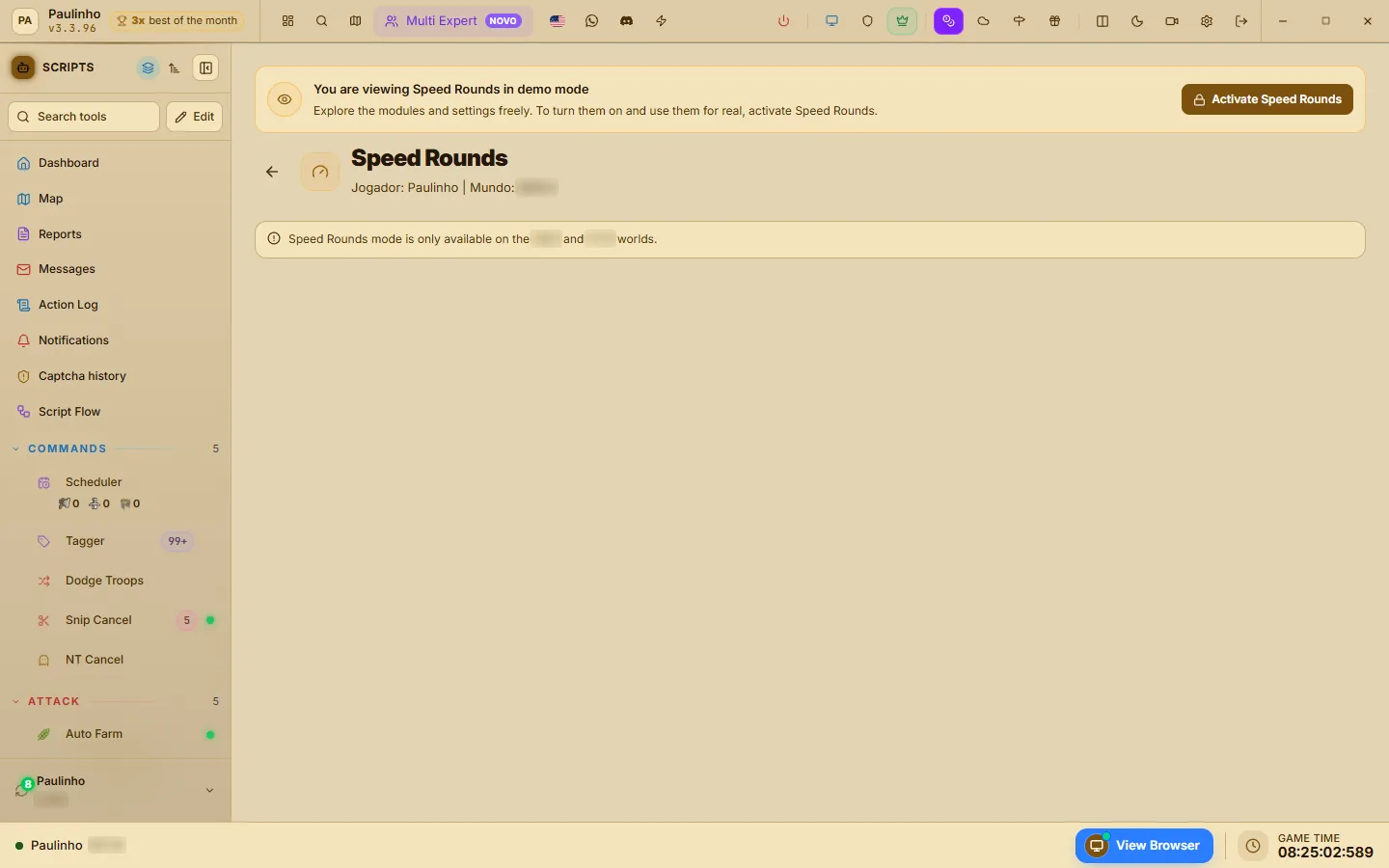
The mode only exists on accounts from the BRS1 and PTS1 worlds. On any other world, the screen shows "Speed Rounds mode is only available on the BRS1 and PTS1 worlds." and offers no buttons.
-
See whether you already have the add-on
The "Speed Rounds" card in My subscription shows where you stand: "Included" for the lifetime plan, "Active until" the end date if you bought it, or "Sales paused" while sales are stopped. When sales are open, each payment unlocks a period of days, does not renew automatically, and renewing before the end adds the days to what is left. Access is only unlocked after the payment is confirmed.
-
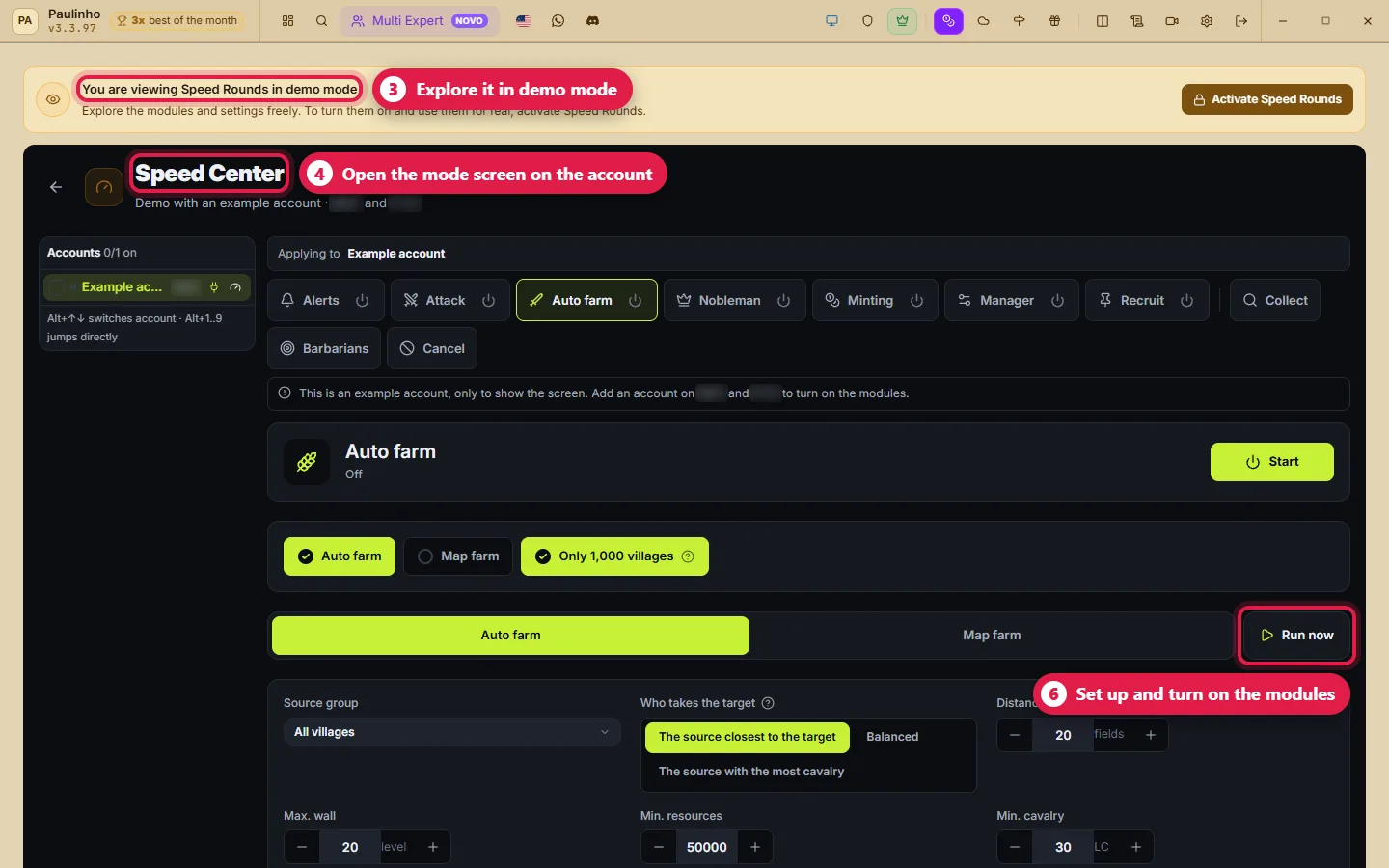
Explore it in demo mode
With an active plan and without the add-on, the screen opens with the "You are viewing Speed Rounds in demo mode" banner. You can switch modules and change settings freely; turning on or running opens the purchase card instead. On the Speed Center, without any BRS1 or PTS1 account, an "Example account" shows up only to show the screen.
-
Open the mode screen on the account
With the account connected, click Speed Rounds in the sidebar. Without the session, you see "Connect the account to use Speed Rounds mode.". The top shows the world, how many modules are on (or "All stopped") and the "Speed Center" and "Stop all" buttons.
Open the mode screen on the account -
Turn on Speed Round Mode if you want a trimmed menu
The top bar of a BRS1 or PTS1 account has the "Speed Round Mode" switch. It keeps only what a speed round uses in the menu (Speed Rounds, Scheduler, Recruitment, Construction, Minting, Nobling, Tribe and Notifications) and turns off the account's normal-world automations. Defender OP Mode and Speed Round Mode are never on at the same time.
-
Set up and turn on the modules
The cards at the top are the modules: Auto farm, Barbarians, Collect, Attack, Manager, Minting, Nobleman, Recruit, Cancel and Alerts. Click a card to open its settings; the switch in the corner turns it on or off without opening it. Single-pass modules (such as Barbarians, Collect and Cancel) run from the button on the panel. "Run now" runs the open part without waiting for the interval.
-
Follow it in the Live log
Next to the panel, the "Live log" shows what the open module is doing, plus the highlight lines of all of them. The mode runs in the account's own tab: leaving the screen does not stop anything.
-
Control several accounts from the Speed Center
Click "Speed Center" (or search "Central Speed" with
Ctrl+K). BRS1 and PTS1 accounts sit in a column on the left: one click puts the account in focus, and Alt plus the arrow keys or Alt+1 to 9 switch with the keyboard. Each account's checkbox selects who gets the settings and buttons together with the focused account, or "All" at once. Every time it opens, the screen goes back to applying only to the focused account.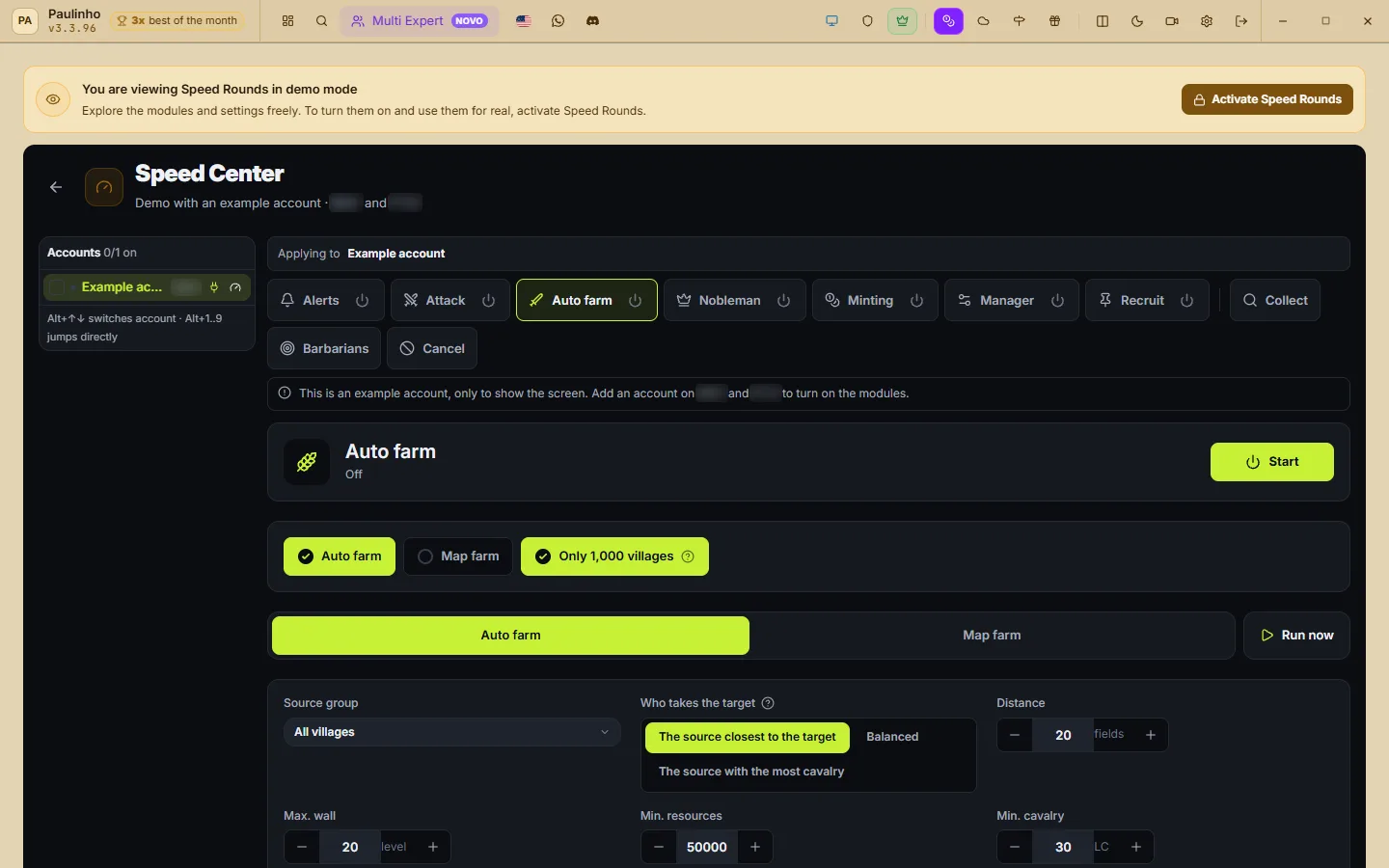
Control several accounts from the Speed Center -
Split targets across accounts
In the Speed Center's Attack module, "Split targets across accounts" takes the whole list in "Paste all the coordinates". "Split evenly" divides it across the selected accounts (the remainder goes to the first ones). Check it and click "Save in each account" or "Save and send in all".
What each option does
| Option | What it is for |
|---|---|
| Auto farm | Farming through the loot assistant, with the "Map farm" sub-tab to sweep the map around the sources. "Only 1,000 villages" reads only the group's first thousand villages in one request. |
| Barbarians (Grab barbarians) | Collects barbarian coordinates by center, radius, continents, points and gap between targets. |
| Collect (Collect by player) | Picks players by name or from the ranking and pulls their village coordinates, in blocks, with "Use in Attack". |
| Attack | Sends attacks, supports or noblemen to a target list, with "Calculate", "Fire" and "Discard". |
| Manager (Account manager) | Auto research, Auto AM and Auto troops with the Account Manager templates, "Fetch templates" and "Prepare this account" with the settings every new account needs. |
| Minting | Mint automatically and "Resource request" to gather resources in one village. |
| Nobleman | Automatic noblings, "Send ready ones" and "Make nobleman". |
| Recruit (Mass recruitment) | Recruits the difference to each village's goal, keeping resources and population aside. |
| Cancel (Cancel recruitment) | Cancels what has not finished in the queue, with resources and population returned. Noblemen and the paladin are never included. |
| Alerts | Warns when an attack arrives and when the captcha or a failure stops everything, with a sound alarm. |
| Module strip (Speed Center) | Shows on which accounts the open module is running; turns it on or off on each account with one click, or on all at once, with "Turn on in all", "Turn on in the N stopped" and "Stop in the N". |
| Connect all and Stop everything in all (Speed Center) | Connects the disconnected accounts and stops every module on every account. |
Tips
- On the Speed Center, groups and templates are matched by name. An account without a group or template with that name is refused, and the results board says why.
- A disconnected account on the Speed Center is not a failure: the settings are saved on it and apply when it connects. The results board lists the ones left out.
- Use "Log of all" on the Speed Center to see what every account is doing, each line with the account's name.
Common problems
I cannot buy Speed Rounds.
Sales are paused for now. If you already have the add-on you keep using it until the end of your period, and an active lifetime plan already includes Speed.
Does the Complete plan unlock Speed Rounds?
No. Speed Rounds is an add-on billed outside the license; only an active lifetime plan already includes it.
The screen says the mode is only available on BRS1 and PTS1.
The account is on another world. The world list is closed: a new world only gets in after it is tested.
I clicked to turn it on and the purchase screen opened.
The account is in demo mode, without the add-on. You can change the settings, but nothing turns on until the add-on is active.
The Speed Center shows "Example account".
There is no BRS1 or PTS1 account registered. Add an account on those worlds to turn on the modules.
See also
Do not have PS Evolution yet?
The download is free: download it, create your account inside the app and try everything for 24 hours, no card.